
Download BeeTV APK
Get the latest BeeTV APK for Android in 2026. Learn how to download and install it, explore key features, device compatibility, and more.
Category: Streaming App
Version
v4.8.0
Size
15–19 MB
Android
5.0+
Update Date
18 August 2026
Screenshots:
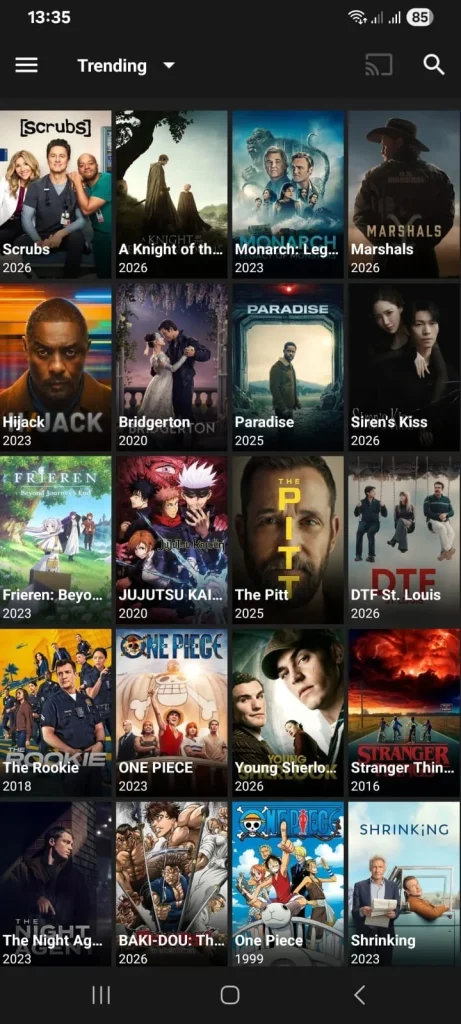

BeeTV APK is a third-party Android streaming application that has become popular among users looking for a simple way to browse movies and TV shows from one interface. Unlike apps distributed through the Google Play Store, BeeTV is generally installed through an APK file, which means users need to sideload it manually.
For this guide, we reviewed information appearing across multiple BeeTV-related websites, including download pages, installation guides, FireStick tutorials, alternative-app comparisons, and safety discussions. One important finding is that different websites currently advertise different BeeTV versions and even different download domains. Because of that inconsistency, users should verify an APK carefully instead of assuming that every website claiming to be the “official” BeeTV source is trustworthy.
This detailed guide from appdroid.net explains what BeeTV APK is, how it works, its features, supported devices, installation methods, common problems, safety considerations, legal concerns, alternatives, and more.
Quick Highlights of BeeTV APK
What Is BeeTV APK?
BeeTV APK is the Android package file used to install the BeeTV application outside the normal Google Play Store distribution process. The app is commonly described as a third-party streaming application that aggregates links to movies and television content rather than operating like a conventional licensed streaming service.
Several guides describe BeeTV as a scraper or link-aggregation application. In simple terms, the app searches available online sources and presents streaming links inside its interface. The actual availability, resolution, subtitles, and playback reliability can therefore vary from one title or source to another.

Because BeeTV is normally obtained outside official app stores, installation requires more care than installing a standard Android application. Users should also understand that the APK file and the content sources are separate issues: downloading an APK from an unverified website can create security risks, while the legality of a particular stream depends on the rights associated with that content.
Who Developed It
- AlexMods built the early foundation and much of the original feature set
- HeyMods took over the main branch, rebuilt the theme engine and added the anti-ban layer
- Original GB Team maintains current releases and tracks official WhatsApp updates
BeeTV APK at a Glance
| Category | Details |
|---|---|
| App name | BeeTV |
| App type | Third-party streaming application |
| File format | APK |
| Main platform | Android |
| Common TV platforms | Android TV and compatible Fire TV devices |
| Content | Movies and TV shows |
| Installation | Manual APK sideloading |
| Google Play Store | Generally unavailable |
| External players | Supported according to several guides |
| Subtitles | Available according to multiple sources |
| Streaming quality | Depends on the available source |
| Real-Debrid | Reported support |
| Trakt | Reported support |
| Cost of app | Generally advertised as free |
| Main concern | Unverified APK sources and third-party streams |
Version information is inconsistent across current websites. One download page lists version 4.7.2, while a FireStick guide reviewed in April 2026 discusses version 4.6.2 and another installation guide refers to 4.6.3. This is a good reason to verify the exact file before installing rather than relying solely on a version number shown in a search result.
How Does BeeTV APK Work?
BeeTV is different from a traditional service such as a subscription streaming platform.
Instead of necessarily hosting the video files itself, the application can gather links from various online sources and display them to the user. When a movie or TV episode is selected, BeeTV may provide multiple sources with different resolutions and file-hosting characteristics.
This model has both advantages and disadvantages.
The advantage is that users may have several playback choices. If one source is unavailable, another may work. The disadvantage is that links can become outdated, disappear, buffer, or provide inconsistent video quality.
This is why the same movie can sometimes work perfectly for one user and fail for another. The result depends on the available sources, internet connection, device, external player, and other factors.
Main Features of BeeTV APK
Large Movie and TV Show Library
BeeTV provides a large collection of movies and TV shows in one place, making it easier to discover and search for entertainment content.
Simple Interface
BeeTV has a straightforward interface that lets users browse, search, and select content without complicated menus.
Multiple Streaming Sources
The app may provide multiple streaming sources for the same title, giving users alternatives when one source is unavailable or does not work properly.
HD and Higher-Resolution Options
Depending on the available source, device, and internet connection, BeeTV may offer HD and higher-resolution playback options.
Subtitle Support
BeeTV can provide subtitles in different languages when they are available for a particular movie or TV show.
External Video Player Support
Some versions of BeeTV support external video players, which can offer additional playback, subtitle, and audio controls.
Real-Debrid Integration
Certain BeeTV versions may support Real-Debrid, which can provide access to additional hoster links and potentially improve streaming quality and reliability.
Search and Content Organization
The app includes search and content organization features that help users quickly find movies and TV shows using categories, genres, years, and other filters.
Supported Devices
Android Phones and Tablets
Android is the primary environment for an APK-based application. If the device permits installation from a trusted APK source, BeeTV can be installed manually.
The exact Android version requirement varies between published versions. One current download page lists Android 6.0 and newer, while another installation guide advertises compatibility with Android 5.0 and newer.
Because requirements can change between builds, check the requirements associated with the exact APK before installation.
Android TV
BeeTV is also frequently discussed for Android TV devices. The larger-screen interface can make movie browsing more convenient from a television.
Installation generally involves downloading the APK through a browser or a downloader application and then installing it manually.
FireStick and Fire TV
BeeTV is commonly used in FireStick discussions, but it is not generally distributed through the Amazon Appstore. Users therefore need to sideload it.
A FireStick installation guide explains that users first need to enable the appropriate developer settings and then use Downloader to obtain the APK.
Compatibility should not be assumed for every Fire TV device. Current Fire TV hardware and operating systems can differ, so check the exact model before attempting APK installation.
Android TV Boxes
Compatible Android TV boxes can also run APK applications. Performance will depend on available RAM, processor performance, storage, Android version, and network quality.
How to Install BeeTV APK on Android
Installing an APK is different from installing an application through Google Play.
Step 1: Check the APK Source
First, verify where the APK is coming from. Avoid downloading files simply because a page labels itself “official.”
Current search results show several unrelated websites claiming to distribute BeeTV, and published version numbers are not consistent.
Step 2: Download the APK
Download the APK only from a source you have independently decided to trust.
Before opening it, check the filename, file size, version information, and other available authenticity information.
Step 3: Allow APK Installation
If Android blocks the installation, open the security settings and allow the browser or file manager being used to install applications from that source.
The exact menu names can vary according to Android version and device manufacturer.
Step 4: Install the Application
Open the downloaded APK and select Install.
Wait until Android finishes the installation process.
Step 5: Review Permissions
When opening BeeTV for the first time, carefully review any permission requests. Avoid granting unnecessary permissions that are unrelated to the application’s purpose.
Step 6: Open BeeTV
After installation, launch the application and review its available settings, playback options, subtitles, and external-player preferences.
How to Install BeeTV on Android TV
The general process is similar to Android phones, although TV interfaces are different.
- Open the TV’s security or application settings.
- Enable installation from the required unknown source if necessary.
- Download the BeeTV APK using a compatible browser or downloader.
- Open the downloaded APK.
- Select Install.
- Wait for installation to finish.
- Launch BeeTV from the application menu.
- Configure subtitle and playback preferences.
Several installation guides describe this general sideloading process for Android TV.
How to Install BeeTV on FireStick
FireStick requires a different process because BeeTV is not normally available through the Amazon Appstore.
Enable Developer Options
On supported Fire TV devices, go to the device settings and open the relevant My Fire TV and developer settings.
Enable installation from unknown sources for the downloader application being used.
A current FireStick guide describes enabling Developer Options by selecting the device name repeatedly and then enabling Apps from Unknown Sources.
Install Downloader
Search for the Downloader application in the Amazon Appstore and install the legitimate version.
Download BeeTV
Open Downloader and enter a BeeTV APK address obtained from a source you have independently verified.
Be careful with downloader codes published on random websites. Such codes can change, redirect, or point to files that are not what you expect.
Install and Clean Up
Once the APK downloads, install it and remove the downloaded installer afterward if it is no longer required.
Deleting the installer can recover storage space on devices with limited capacity.
BeeTV APK Permissions and Privacy
One of the most important things to consider with any sideloaded APK is privacy.
A legitimate-looking website does not automatically prove that an APK is safe. Users should examine:
- Requested permissions
- APK source
- File reputation
- Digital signature information when available
- Security scanner results
- Unexpected redirects
- Suspicious advertisements
- Unusual behavior after installation
Current BeeTV-related research also points out that some publisher pages do not provide strong verification information such as a checksum or signing-certificate fingerprint.
For this reason, appdroid.net recommends treating BeeTV APK downloads as third-party software and exercising additional caution.
Is BeeTV APK Safe?
There is no universal answer that makes every BeeTV APK file safe.
The biggest issue is the distribution ecosystem. There are multiple BeeTV-related domains, clones, old builds, and download pages online. A website calling an APK “official” is not enough evidence that the file is authentic.
Independent website checks also produce mixed results. For example, one security analysis of a BeeTV-related domain found no major immediate malware warning but still noted that the evidence was not strong enough to treat the website as fully established.
For safer APK handling:
- Download only from a source you trust like: “appdroid.net“.
- Scan the APK before opening it.
- Avoid modified APKs when possible.
- Do not install suspicious companion applications.
- Review permissions carefully.
- Keep Android and security software updated.
- Avoid entering sensitive personal information into an unfamiliar streaming application.
- Delete the APK installer after installation if you do not need it.
Is BeeTV APK Legal?
The legality of BeeTV cannot be determined simply by the application name.
BeeTV-related guides commonly describe the application as a link aggregator rather than a service that directly hosts every movie and television program.
The legal status of watching a particular stream depends on several factors, including:
- Whether the content is properly licensed
- Where the user is located
- The source providing the stream
- Local copyright law
- The rights held by the content owner
Users should only access content they are legally entitled to view. Free availability does not automatically mean that a movie or show is legally licensed for free distribution.
BeeTV APK Pros and Cons

Pros
- Simple interface for browsing entertainment.
- Designed primarily for movies and TV shows.
- Multiple streaming sources may be available.
- Subtitle support is commonly reported.
- External video players can improve playback flexibility.
- Android TV and compatible FireStick use is widely documented.
- Real-Debrid integration is reported by several guides.
- Trakt support is reported on some versions.
- The application itself is generally advertised as free.
Cons
- Usually requires APK sideloading.
- Not generally available through the Google Play Store or Amazon Appstore.
- Different websites advertise different BeeTV versions.
- Some download sources are difficult to verify.
- Streaming links can become unavailable.
- Video quality can vary between sources.
- Ads may be present.
- External players may be needed for some playback situations.
- Third-party APK installation carries additional security risks.
- The legality of individual streams can vary by location and source.
Common BeeTV APK Problems and Solutions
BeeTV APK Will Not Install
Check whether the Android version is compatible with the APK.
Also verify that installation from the selected source is permitted and that the APK file completed its download properly.
If the file is corrupted, downloading it again from a trusted source may resolve the problem.
BeeTV Is Buffering
Buffering can result from slow internet, overloaded sources, poor-quality links, or device limitations.
Try another available source, lower the playback resolution, restart the application, and test the internet connection.
For 1080p streaming, a stable connection is more important than simply having a high advertised internet speed.
Streams Are Not Working
BeeTV relies on external sources, so broken links are an inherent possibility.
If one source fails, try another available source. If almost every title is affected, the application or its source providers may be experiencing a broader problem.
Subtitles Are Not Working
Try refreshing subtitle sources or selecting another subtitle language.
If the built-in option does not work, an external video player may provide better subtitle controls. BeeTV-related troubleshooting guides specifically recommend external players for some subtitle and synchronization problems.
Audio and Video Are Out of Sync
Try restarting the stream or switching to another source.
You can also test an external player, as different players may handle particular video formats differently.
BeeTV Keeps Crashing
Clear the application’s cache first.
If the problem continues, restart the device and check whether a newer verified version is available. Avoid replacing the app with random APK builds simply because they claim to fix crashes.
BeeTV APK vs. Other Streaming Options
| Feature | BeeTV | Stremio | Kodi | Tubi | Pluto TV |
|---|---|---|---|---|---|
| APK sideloading commonly required | Yes | Depends on device/source | Depends on device | No | No |
| Movies and TV | Yes | Yes | Yes | Yes | Yes |
| Free option | Yes | Yes | Yes | Yes | Yes |
| Third-party source dependence | High | Depends on add-ons | Depends on add-ons | No | No |
| Live TV | Reported on some sources | Through services/add-ons | Through add-ons | Limited | Strong focus |
| Customization | Moderate | High | Very high | Low | Low |
| Official app-store distribution | Limited | Wider | Wider | Yes | Yes |
| Legal licensing clarity | Varies by source | Depends on content/add-on | Depends on source/add-on | Licensed | Licensed |
Legal services such as Tubi and Pluto TV generally provide a clearer licensing model, while applications that depend on third-party sources require users to pay more attention to where particular content comes from.
Best Alternatives to BeeTV APK
If BeeTV is unavailable or unreliable, several alternatives are commonly discussed.
Stremio
Stremio is a popular choice for users who want a more organized streaming interface and add-on-based ecosystem. Its approach is different from BeeTV, giving users more control over how content sources are integrated.
Kodi
Kodi is better suited to users who want extensive customization. It can handle local media and support different content services through add-ons.
Cinema HD
Cinema HD is frequently listed alongside BeeTV as a similar third-party streaming application. Its interface and source aggregation model make it a familiar alternative for users who are already comfortable with APK-based streaming apps.
Nova TV
Nova TV is another application commonly compared with BeeTV, particularly for Android TV and FireStick users.
Tubi
Tubi is a useful choice for users who prioritize a licensed free streaming platform rather than sideloaded APK applications. It uses advertising rather than requiring a conventional subscription for its free catalog.
Pluto TV
Pluto TV is another established free option, especially for users who want live channels alongside on-demand content.
How to Choose the Right BeeTV Version
Version numbers alone should not determine which APK you install.
Before downloading, check:
- Whether the source is trustworthy.
- Whether the version matches your device.
- Whether the APK has been modified.
- Whether security information is available.
- Whether the file has a suspiciously large number of permissions.
- Whether independent sources report problems with that build.
- Whether the download page is using misleading “official” claims.
Current BeeTV search results show version discrepancies, including v4.7.2, v4.7.1, v4.6.5, v4.6.3, and v4.6.2 across different pages.
That inconsistency is one of the strongest reasons to verify the APK rather than automatically installing the newest-looking file.
Tips for a Better BeeTV Experience
For a smoother experience, keep the following practices in mind:
- Use a stable Wi-Fi or wired connection.
- Keep enough free storage on your device.
- Clear the app cache when performance becomes sluggish.
- Try another source when a stream fails.
- Use subtitles that match the selected source.
- Consider a compatible external player if playback is problematic.
- Keep your Android device updated.
- Do not install unnecessary companion APKs.
- Scan unfamiliar APK files before installation.
- Use only legally accessible content.
Frequently Asked Questions
Final Verdict
BeeTV APK 2026 remains an interesting option for Android and compatible TV-device users who want a simple interface for discovering movies and TV shows. Its commonly reported features include multiple streaming sources, subtitles, external-player support, and integrations such as Real-Debrid and Trakt.
However, the biggest issue in 2026 is not the basic interface but the fragmented BeeTV distribution ecosystem. Different websites currently advertise different versions, while some sources make difficult-to-verify claims about being official.
For that reason, users should approach BeeTV as third-party software, verify the APK before installation, avoid suspicious modified builds, and pay attention to the copyright laws that apply to their location.
At appdroid.net, our recommendation is to prioritize trustworthy software sources, device security, privacy, and legally accessible content. If BeeTV becomes unreliable, established alternatives such as Stremio, Kodi, Tubi, or Pluto TV may provide a better fit depending on whether you value customization, free licensed content, or a simpler streaming experience.
