
Download FilmPlus APK
How to download and install FilmPlus APK, discover its latest features, and follow simple setup steps on your Android device with this helpful guide.
Category: Streaming App
Version
v2.5.1
Size
21 MB
Android
5.0+
Update Date
18 August 2026
Screenshots:
FilmPlus APK is a third-party Android streaming application that has become popular among users looking for a simple way to browse movies and TV shows from one interface. Unlike mainstream streaming services, FilmPlus is generally distributed outside major app stores, which means users need to understand how it works, what devices it supports, and the risks associated with unofficial APK files.

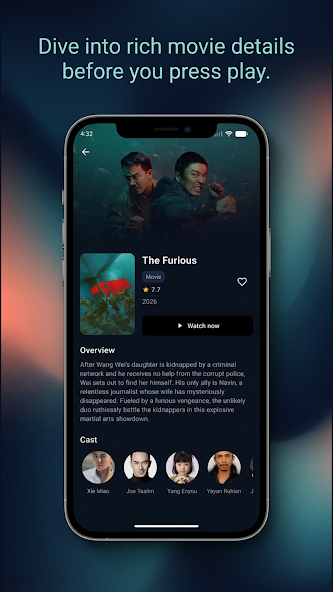
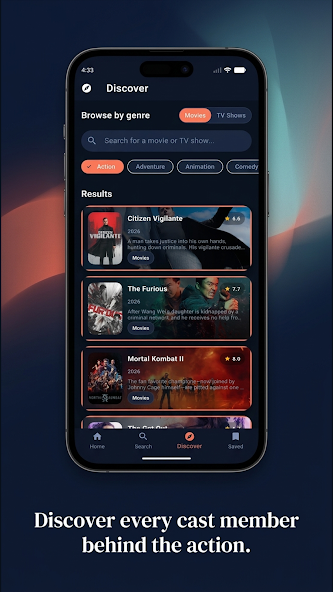
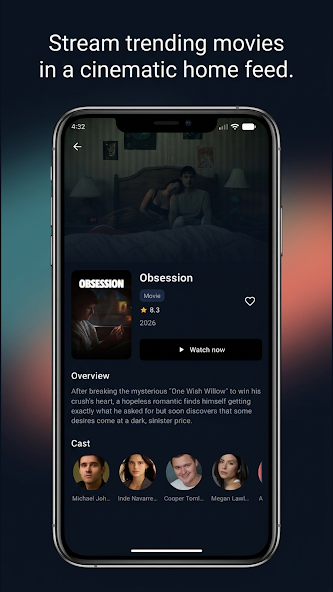
For this guide, appdroid.net reviewed information appearing across leading FilmPlus-related websites, installation guides, troubleshooting resources, and the Google Play listing for the similarly named Filmplus Player. The research shows that there is also considerable confusion between the FilmPlus streaming APK and unrelated apps using the Filmplus name.
This guide explains FilmPlus APK in straightforward language so you can understand its features, compatibility, installation process, advantages, limitations, and safety considerations before using it.

What Is FilmPlus APK?
FilmPlus APK is commonly described online as an Android-first third-party streaming application for finding movies and TV shows. Rather than functioning like Netflix or another licensed streaming platform, FilmPlus is generally presented as an aggregator that obtains streaming links from external sources.
This distinction is important. FilmPlus does not operate like a conventional subscription service with its own licensed catalog. The availability and quality of streams can depend on external hosts, which means a title may work at one time and become unavailable later.
Several current guides also describe FilmPlus as a successor or fork associated with the older Terrarium TV ecosystem.
Because FilmPlus is distributed through websites rather than the standard Google Play Store, users should be particularly careful about where an APK file comes from. Different websites may use the FilmPlus name while distributing different files.
FilmPlus APK at a Glance
| Item | Details |
|---|---|
| App name | FilmPlus APK |
| App type | Third-party streaming application |
| Main content | Movies and TV shows |
| Primary platform | Android |
| Android TV support | Commonly reported |
| Fire TV support | Commonly reported through sideloading |
| Google Play availability | The Filmplus streaming APK is generally not listed as a standard Play Store app |
| Subscription | Commonly promoted as free |
| External players | May be required depending on the version/source |
| Real-Debrid support | Reported by several guides |
| Trakt integration | Reported by several guides |
| Casting | Reported by some FilmPlus-related sources |
| Internet connection | Required for streaming |
| Safety | Depends heavily on APK source and external links |
| Legal status | Depends on the content and applicable copyright laws |
How Does FilmPlus APK Work?
FilmPlus is best understood as a content-link aggregator rather than a traditional streaming service.
When you search for a movie or TV show, the application may display information about the title and available streaming sources. Selecting a source can send the playback request to an external host.
This explains why FilmPlus can sometimes display several links for the same movie. It also explains why some links may stop working, buffer, disappear, or provide different video quality.
External sources have no guaranteed uptime. If a host removes a file, changes its address, becomes overloaded, or blocks a particular region, FilmPlus may not be able to provide a working stream.
Key Features of FilmPlus APK
External Media Player Support
Depending on the FilmPlus version, users may be asked to use a separate video player. Some current guides mention players such as BPlayer or other compatible players, while another guide says FilmPlus includes an Exo Player but recommends an external player.This can be helpful for compatibility, but installing additional players also introduces another software source that users need to evaluate carefully.
Real-Debrid Integration
Several FilmPlus guides report support for Real-Debrid integration.A debrid service can provide access to premium-host links where supported. This is an optional feature and is separate from FilmPlus itself.
Users should understand that a third-party service does not automatically make every piece of content accessible through FilmPlus legal or officially licensed.
Trakt Integration
Some versions and guides also describe Trakt integration for synchronizing watchlists, viewing history, and recommendations.
This can be useful for people who move between different devices or applications.
Favorites and Watch-Later Features
The application can provide options for saving titles for easier access later. The Google Play listing for the separate Filmplus Player also advertises favorites and a save-for-later feature, although that Play Store application should not be confused with the FilmPlus streaming APK.
Subtitle Support
Several FilmPlus sources describe subtitle functionality, including the ability to add or select subtitles while watching supported content.
Subtitle availability depends on the selected source and title.
Search and Discovery
A search function makes it easier to locate a specific movie or series instead of manually browsing a large catalog.
The app can also organize titles into categories, making it easier to discover popular or recently added content.
Multiple Streaming Sources
A major difference between FilmPlus and a conventional streaming service is the use of multiple external links.
A single title may have several available sources. This can be useful when one source is unavailable, although it can also create inconsistency in playback quality.
HD and Higher-Resolution Sources
FilmPlus-related websites commonly advertise HD, Full HD, and sometimes 4K or UHD links.
However, advertised resolution should not be interpreted as a guarantee. Independent guides report that many available links may be lower quality, while higher-resolution sources can be more prone to buffering depending on the host and connection.
Simple User Interface
FilmPlus is generally designed around a straightforward browsing interface. Users can navigate between movies, TV shows, favorites, settings, and other sections without dealing with the more complicated menus found in some media applications.
Some guides describe the interface as lightweight and suitable for remote-based navigation on television devices.
Large Movie and TV Show Library
One of FilmPlus’s main attractions is its broad collection of movie and television listings. Current third-party guides describe it as providing access to thousands of movies, shows, episodes, and other entertainment categories.
The actual availability of a title can change because FilmPlus relies on external sources.
FilmPlus APK Compatibility
FilmPlus is primarily associated with Android devices, but its compatibility can vary depending on the version.
Android Phones and Tablets
Android phones and tablets are the main category associated with FilmPlus APK. Some FilmPlus sources list Android 5.0 or later as a basic requirement, while newer versions may have different requirements.
Before installing an APK, users should check the Android version, available storage, and whether the APK architecture is compatible with their device.
Android TV
FilmPlus is also commonly discussed for Android TV boxes and Google TV-compatible hardware.
A television-friendly interface can make browsing easier with a remote, although external players and source availability may affect the overall experience.
Amazon Fire TV and FireStick
FilmPlus is frequently discussed in FireStick installation guides. Since the streaming APK is not normally installed through the Amazon Appstore, these guides use sideloading methods.
The exact Fire TV installation process can change as Amazon updates its software and security controls.
Windows and Mac
Some FilmPlus websites claim that the APK can be used on Windows or macOS through Android emulators.
This is not the same as having a native Windows or Mac application. An emulator creates an Android environment where compatible APK files can run.
How to Install FilmPlus APK on Android
Because FilmPlus is generally distributed outside the mainstream Android app stores, installation can involve sideloading.
The basic process is:
Android’s security settings and terminology vary between manufacturers, so the exact menu names may differ.
Important: Do not install an APK simply because a website labels it “official,” “safe,” or “latest.” Several FilmPlus-related websites explicitly acknowledge that they are unofficial third-party sites and are not the developers or owners of the application.
How to Install FilmPlus on FireStick
FilmPlus installation guides generally use the Downloader application because the APK is not normally available through the Amazon Appstore.
The general procedure is:
Amazon changes Fire TV menus from time to time, so instructions written for an older FireStick interface may not exactly match a newer device.
FilmPlus APK Settings You Should Know
Once installed, users may find several useful settings.
Video Player Settings
If the default player fails to load a stream, an alternative supported player may work better.
However, installing several third-party players just to make an unofficial application work can increase complexity. Only install software from sources you trust.
Subtitle Settings
Subtitle settings can be used to select languages, adjust subtitle appearance, or enable subtitles when supported by the selected stream.
Playback Quality
Choosing a lower resolution can help reduce buffering when the internet connection is slow.
For example, a stable 720p stream may provide a better viewing experience than repeatedly buffering 4K video.
Real-Debrid Settings
Users with an eligible Real-Debrid account may find a login or authorization option inside FilmPlus. Several installation guides describe this integration.
Common FilmPlus APK Problems and Fixes
FilmPlus does not always work consistently because playback depends partly on external sources.
FilmPlus Is Not Loading
First, check your internet connection and restart the application.
You can also clear the app cache, restart the device, and try another title.
FilmPlus Keeps Buffering
Buffering can be caused by slow internet, overloaded streaming hosts, or a poor-quality source.
Try selecting another available source or lowering the video quality.
Independent troubleshooting guidance also recommends testing the internet connection, clearing cache, trying another source, and checking the external player when FilmPlus fails.
Links Are Not Working
Broken links are one of the biggest limitations of link-aggregating applications.
If several sources fail for the same title, the problem may be upstream rather than with your phone.
External Player Keeps Appearing
Some versions of FilmPlus may depend on an external player.
If the application repeatedly requests a player, verify that the player is genuinely required and download it only from a trustworthy source.
FilmPlus Crashes
Try these basic steps:
Is FilmPlus Safe to Use?
There is no universal answer because safety depends on the specific APK file, its source, permissions, advertisements, redirects, and external players involved.
FilmPlus is commonly distributed outside major app stores, which means users do not have the same level of platform-level verification they would receive from a mainstream app marketplace. One current FilmPlus guide specifically warns that unofficial APKs and pop-up player prompts can increase security concerns.
Some FilmPlus-related websites claim that their files are safe, but such claims should not be treated as independent security certification.
The Google Play Store does contain an application named Filmplus – Player, but Google Play identifies it as a video player from a developer named Cassaw CARSWELL. It is not evidence that the separate FilmPlus streaming APK is an official Play Store application.
Basic Safety Checklist
Before installing any third-party APK:
- Use a reputable source.
- Check the file with a trusted mobile security solution.
- Avoid modified APKs from unknown uploaders.
- Review requested permissions.
- Do not provide unnecessary personal information.
- Be careful with pop-ups and redirects.
- Avoid installing unknown companion applications.
- Keep Android and security software updated.
- Remove the APK installer after installation when appropriate.
Is FilmPlus APK Legal?
The legality of using FilmPlus depends on what content is accessed, where the content comes from, and the laws of the country in which you use it.
FilmPlus-related websites themselves provide conflicting descriptions and disclaimers, with some acknowledging that they are unofficial third parties and do not own the application.
A major concern is copyrighted content. If a movie or TV show is being distributed without the copyright holder’s permission, accessing or downloading it may violate applicable copyright law.
For this reason, appdroid.net recommends using streaming applications and sources that have the appropriate rights to distribute the content you watch.
The safest approach is to verify that the specific content and service are authorized in your region.
FilmPlus APK Pros and Cons
| Pros | Cons |
|---|---|
| Simple interface | Not a conventional licensed streaming service |
| Large range of movie and TV listings | Availability of links can change |
| Multiple sources may be available | Some links may be broken |
| Supports Android-focused devices | Usually requires sideloading |
| Can work with TV devices | External players may be required |
| Some versions support subtitles | Subtitle availability varies |
| Real-Debrid integration is reported | Debrid account is separate and may cost money |
| Trakt integration is reported | Features can vary between versions |
| Lightweight versions are advertised | APK sources can be difficult to verify |
| No conventional subscription is commonly promoted | Copyright and security risks require careful consideration |
FilmPlus APK vs Traditional Streaming Services
FilmPlus differs significantly from services such as Netflix, Prime Video, Disney+, or other licensed platforms.
| Feature | FilmPlus APK | Traditional Streaming Service |
|---|---|---|
| Distribution | Usually third-party APK | Official app stores |
| Content licensing | Varies by source | Generally licensed |
| Subscription | Commonly promoted as free | Usually paid or ad-supported |
| Streaming sources | External sources | Controlled service infrastructure |
| Reliability | Can vary | Generally more predictable |
| Security verification | Depends on APK source | Platform and developer controls |
| Device support | Android-focused | Usually broad official support |
| Updates | Can vary by APK source | Officially managed |
| Customer support | Often limited | Usually available |
| Legal clarity | Can vary | Usually clearer |
Who Should Consider FilmPlus APK?
FilmPlus may interest users who want a simple Android interface for discovering movies and TV shows and who understand the limitations of third-party applications.
It may be less suitable for people who want:
For users who prioritize reliability and legal certainty, official streaming platforms are generally the better choice.
Tips for a Better FilmPlus Experience
If you decide to explore FilmPlus, a few practical habits can reduce common problems.
First, maintain a stable internet connection. Streaming quality depends heavily on bandwidth and the reliability of the selected host.
Second, avoid assuming that the highest resolution is always the best option. A stable Full HD stream can be preferable to a constantly buffering UHD source.
Third, keep your device updated and regularly remove applications you no longer use.
Finally, remember that FilmPlus latest versions and third-party sources can change. A feature available in one build may not exist in another.
Frequently Asked Questions
Final Verdict on FilmPlus APK
FilmPlus APK remains a recognizable name in the third-party Android streaming space because of its simple interface, large collection of movie and TV listings, multiple streaming sources, and reported integrations with services such as Real-Debrid and Trakt.
However, the same third-party design that makes FilmPlus flexible also creates its biggest weaknesses. Links can stop working, playback quality can vary, external players may be required, and APK files obtained from unofficial sources can introduce security concerns. Current troubleshooting and installation resources also report problems involving broken links, buffering, and player compatibility.
For readers of appdroid.net, the most important point is to understand what FilmPlus is before installing it. It should not be treated as an equivalent to an official licensed streaming platform. If you choose to use a third-party streaming application, verify the software source carefully and make sure the content you access is legally available in your region.
For the safest and most reliable entertainment experience, official streaming services and legitimate content providers remain the preferred option.
