

Download Flix Vision APK
Explore Flix Vision APK latest version, key features, download information, and simple setup instructions for Android users who want to get started easily.
Category: Streaming App
Version
v3.7.0r
Size
32–33.18 MB
Android
5.0+
Update Date
18 August 2026
Screenshots:
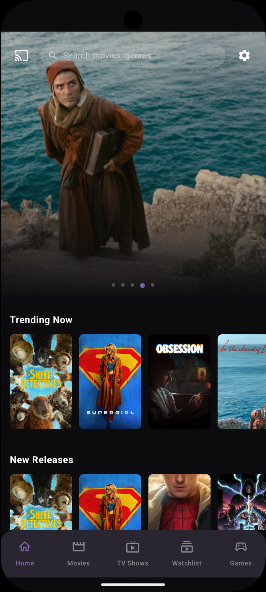

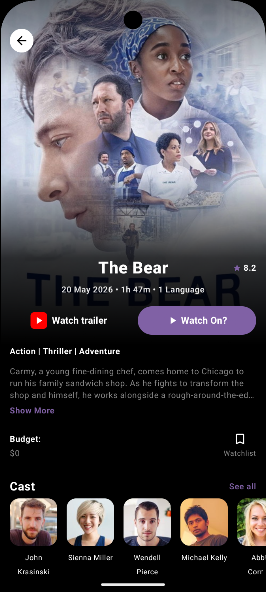


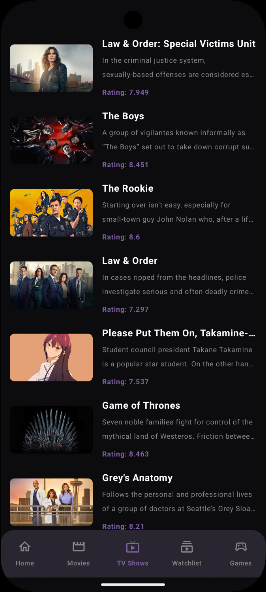
Flix Vision APK is a third-party Android streaming application that has attracted attention from users looking for movies, TV shows, anime, sports, and other entertainment in one place. Unlike services distributed through the Google Play Store, Flix Vision is generally installed through an APK file.
Information published across the leading Flix Vision websites describes different versions, features, supported devices, and installation methods. There are also conflicting claims about safety, video quality, and available content, so users should understand these differences before installing the app.
This guide from appdroid.net explains what Flix Vision APK is, how it works, its main features, compatible devices, installation process, advantages and disadvantages, safety concerns, and common problems.
What Is Flix Vision APK?
Flix Vision APK is an Android application designed around streaming movies, television shows, web series, anime, sports, and other forms of entertainment.
Unlike a conventional streaming service with its own clearly identified subscription catalog, Flix Vision is described by several sources as an aggregator that can retrieve streaming links from external sources. This means availability and playback quality can depend on the individual source rather than only on the application itself.
The application is commonly associated with Android phones, tablets, Android TV devices, TV boxes, and Fire TV-related hardware. Some websites also describe using it on Windows through an Android emulator.

Flix Vision is not consistently represented by one official distribution channel. Multiple websites publish APK files under the Flix Vision name, and the version numbers reported by these sites do not always match.
For that reason, users should verify the APK’s developer, package information, version, permissions, and security results before installing any file.
Flix Vision APK Information
The following table summarizes information reported by the websites reviewed for this guide. Version and file-size information can change as new releases appear.
| Information | Details |
|---|---|
| App Name | Flix Vision |
| App Type | Third-party streaming application |
| Main Platform | Android |
| Common Devices | Android phones, tablets, TV boxes, Android TV |
| Content | Movies, TV shows, series, anime, sports, and other entertainment |
| Installation | APK sideloading |
| Google Play Store | Generally unavailable |
| Login | Some versions claim no account is required |
| Video Quality | Depends on available source and version |
| External Players | Supported by some versions |
| Subtitles | Available for supported content |
| Internet | Required for online streaming |
| Availability | Can vary by region and source |
One current APK listing reviewed during research shows a separate Flix Vision package listed as version 1.0 with a 56.7 MB file size, demonstrating why users should not assume that every website offering a similarly named APK is distributing the same application.
Why Is Flix Vision APK Popular?
The main attraction is the attempt to bring different entertainment categories into a single interface.
Several websites describe movies, TV shows, anime, Korean dramas, live television, sports, documentaries, and other categories. The exact catalog can change because streaming sources and links are not necessarily controlled by the application itself.
Another reason users search for Flix Vision APK is its Android TV-oriented experience. Some versions provide large thumbnails, category menus, remote-friendly navigation, and external-player options.
The app can therefore appeal to people who prefer using an Android TV box or television rather than watching everything on a smartphone.
Main Features of Flix Vision APK
The actual selection can vary considerably because the application may depend on external streaming sources. Users should therefore avoid assuming that every advertised title will always be available.
Large Entertainment Library
Flix Vision is commonly promoted as an all-in-one entertainment application. Sources reviewed for this article mention movies, TV series, anime, dramas, documentaries, live TV, cricket, football, and other categories.
Search and Filtering
Several Flix Vision websites describe a built-in search function and filters. Depending on the version, users may be able to search by title or browse using genre, year, network, popularity, or trending categories. This is particularly useful when the application contains a large number of titles.
HD and High-Resolution Playback
Flix Vision is frequently advertised with HD or Full HD playback. Some websites also claim support for 4K, although actual resolution depends on the available source, device, internet connection, and application version. Users should not assume that a title advertised as 4K will necessarily play in native 4K.
Subtitle Support
Subtitle support is another frequently mentioned feature. Some versions provide subtitles for supported titles and may offer multiple subtitle languages. This can be useful when watching international movies, anime, or dramas. Subtitle availability can vary from one streaming source to another.
External Video Players
Some versions of Flix Vision can work with external media players such as VLC or MX Player. External players can be useful when the built-in player has compatibility, subtitle, audio, or playback-control problems.
Simple Interface
The application is commonly described as having a dark interface with categories and search options.
A TV-friendly interface can also make navigation easier with a remote control. This is one reason the application is frequently discussed in connection with Android TV and TV boxes.
Offline Viewing Claims
Some websites claim that Flix Vision versions provide downloading or offline viewing. However, this feature should be treated carefully because downloading capabilities may differ between versions and sources. Users should also make sure that saving content is permitted by the applicable copyright terms.
No-Login Experience
Some sources report that certain versions do not require users to create an account before accessing the application. This can make initial setup quicker, although users should still review any permissions requested by the APK.
Flix Vision APK on Android TV
Flix Vision is often promoted for Android TV and compatible TV boxes.
The television-focused interface can make browsing easier on a large screen. Some sources report support for Android TV devices running Android 7.0 or newer, while Android-phone listings may support older Android versions. Requirements therefore depend on the specific build being installed.
A typical Android TV setup requires:
Some sources recommend around 10 Mbps for HD and 25 Mbps for 4K streaming, although actual requirements depend on video compression, source quality, and network stability.
Flix Vision APK on Fire TV and Firestick
Flix Vision is also frequently discussed for Fire TV devices.
However, the Firestick situation deserves extra attention. One 2026 review reports that Amazon blocked Flix Vision on Firestick devices in June 2025 and that users subsequently encountered problems with the application.
Because Fire TV compatibility can change after platform-level restrictions or application updates, users should not assume that an APK that worked previously will continue to work.
If you are using a Fire TV device, check its current compatibility and security status before installing any third-party APK.
How to Install Flix Vision APK on Android
Because Flix Vision APK files are generally distributed outside the Google Play Store, installation involves Android’s sideloading process.
Step 1: Check the APK Source
Before downloading anything, verify the website and file.
Look for:
Do not install a file simply because a website labels it as the “latest” version.
Step 2: Review Android Security Settings
Android normally restricts installation of applications from unknown sources.
If you intentionally choose to sideload an APK, Android may require you to grant permission to the browser or file manager being used to open the file.
The exact menu differs between Android versions and manufacturers.
Step 3: Download the APK
Download the APK only after checking its source and security information.
Avoid files that are bundled with unrelated installers, suspicious extensions, excessive permissions, or unusual installation instructions.
Step 4: Scan the File
Before opening the APK, scan it with a reputable mobile security solution or a trusted malware-analysis service.
This is especially important for third-party streaming APKs because they do not receive the same distribution controls as applications installed directly from Google Play.
Step 5: Install the Application
Open the downloaded APK using a file manager.
Review the installation prompt carefully and check the permissions requested by the application.
If the permissions appear unrelated to the application’s purpose, stop the installation and investigate further.
Step 6: Open and Configure the App
After installation, launch Flix Vision and review its settings.
Check:
Only enable features that you actually need.
Is Flix Vision APK Safe?
Is Flix Vision Safe to Use?
Safety is one of the most important considerations before installing Flix Vision APK.
There are conflicting claims online. Some download websites describe their copies as safe, while another 2026 review reports security concerns involving a TraffMonetizer SDK and suspicious detections associated with an APK.
These claims cannot be treated as proof that every Flix Vision APK is malicious. Different websites may distribute different packages, builds, or modified files.
The important point is that users should not assume every APK carrying the Flix Vision name is identical or safe.
Security Precautions
For better protection:
- Download only from a source you have independently evaluated.
- Scan the APK before installation.
- Keep Google Play Protect enabled.
- Review requested permissions.
- Avoid modified or “premium unlocked” APK files.
- Keep Android updated.
- Do not provide unnecessary personal information.
- Remove the application if unusual advertisements, battery drain, or network activity appears.
- Avoid granting accessibility or device-administrator permissions unless you understand why they are needed.
If your security software identifies an APK as suspicious, do not bypass the warning simply to install it.
Is Flix Vision APK Legal?
Legality depends on what content is being accessed, where the content originates, and the copyright laws applicable in the user’s country.
Several websites describe Flix Vision as an aggregator of links from external sources rather than a conventional licensed streaming platform.
That creates an important distinction: the application itself and the content accessed through it are separate issues.
Watching or downloading copyrighted material from an unauthorized source may violate copyright law or the rights of the content owner.
For this reason, users should verify that the content they access is legally available in their region. appdroid.net does not recommend copyright infringement and does not encourage accessing unauthorized streams.
Flix Vision APK Pros and Cons

Pros
- Large range of entertainment categories
- Simple interface
- Search and filtering features
- Support for subtitles on compatible titles
- HD playback on supported sources
- Android TV compatibility reported by several sources
- External-player support in some versions
- Some versions do not require account registration
- Multiple entertainment categories in one application
Cons
- Generally unavailable through Google Play Store
- Requires APK sideloading
- Different websites distribute different versions
- Security claims are inconsistent
- Some reported builds have raised malware or SDK concerns
- Streaming links can stop working
- Video quality depends on the source
Common Problems and Fixes
Flix Vision APK Is Not Installing
Check whether your Android version is compatible and whether enough storage is available.
Also verify that the downloaded file is a valid APK and was not interrupted or corrupted during download.
If Android reports that the app is incompatible, do not attempt to force installation using questionable tools.
Flix Vision Keeps Buffering
Buffering can result from a slow internet connection or an unreliable streaming source.
Try:
- Checking your internet connection.
- Moving closer to your Wi-Fi router.
- Lowering video quality.
- Trying another available source.
- Restarting the application.
- Testing another legitimate streaming service.
Videos Are Not Playing
The selected source may be offline or incompatible with the player.
If the application supports external players, testing a compatible player may help. However, if multiple sources fail, the problem may be with the application or its external links rather than your device.
Subtitles Are Not Working
Try another subtitle track or another available source.
Some versions have had reported subtitle problems, with one 2026 review stating that a later update addressed earlier subtitle issues.
App Crashes
First restart the device.
Then check whether there is sufficient storage and whether the APK version is compatible with your Android version.
If the problem continues, uninstalling the third-party application may be safer than installing another modified build from an unknown website.
Flix Vision APK vs Official Streaming Services
| Feature | Flix Vision APK | Official Streaming Service |
|---|---|---|
| Distribution | Usually APK sideload | Official app store |
| Subscription | Often promoted as free | Usually subscription or supported model |
| Content licensing | Can be unclear | Generally established by provider |
| Security verification | Depends on APK source | Store/provider security controls |
| Updates | May require manual installation | Usually automatic |
| Customer support | Limited or unclear | Usually available |
| Video availability | Depends on external sources | Controlled catalog |
| Account | Some versions claim no login | Usually required |
| Legal clarity | Varies by source/content | Generally clearer |
This comparison explains why convenience alone should not determine whether someone installs a third-party streaming application.
What Makes a Good Flix Vision APK Download Source?
There is no reason to trust a website simply because it uses words such as “official,” “secure,” or “verified.”
Before downloading, check whether the source provides:
The research for this article also found websites with substantially different version numbers and package information. That is a strong reason to verify the exact APK rather than relying on a site’s headline.
Final Verdict on Flix Vision APK
Flix Vision APK 2026 is an interesting third-party streaming application because it attempts to combine movies, TV shows, anime, sports, live television, and other entertainment categories in one interface.
Its Android TV compatibility, search functionality, subtitles, external-player support, and broad category structure can make it appealing to users who prefer a centralized entertainment interface.
However, the application also comes with important limitations. It is commonly installed outside official app stores, versions distributed online are inconsistent, and security reports are not uniform. There are also copyright and licensing questions surrounding content obtained through third-party sources.
For readers of appdroid.net, the safest approach is to research the exact APK version, scan the file, review permissions, keep Android security protections enabled, and use only content that you are legally entitled to access.
FAQs About Flix Vision APK
Conclusion
Flix Vision APK has become a frequently searched name among users interested in third-party entertainment applications for Android and Android TV.
The app’s biggest appeal is its broad range of categories and simple interface. However, users should balance those benefits against sideloading risks, inconsistent APK versions, potential security concerns, uncertain content licensing, and changing device compatibility.
Before installing any Flix Vision APK, verify the exact file, scan it for threats, review permissions, and use the application only for content that is legally available to you. For more Android application guides, compatibility information, and practical installation advice, keep visiting appdroid.net.
