

Download HDO Box APK
Download the latest version of the HDO Box APK for Android in 2026. Learn about its features, installation steps, compatibility, and more.
Category: Streaming App
Version
v4.4.5
Size
31 MB
Android
5.0+
Update Date
18 August 2026
Screenshots:
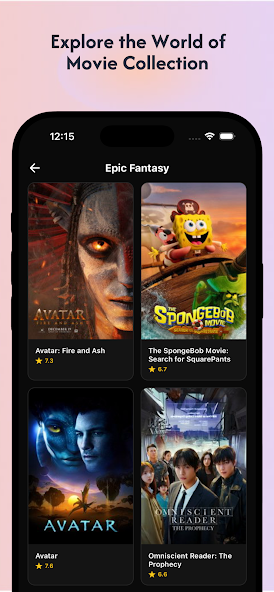


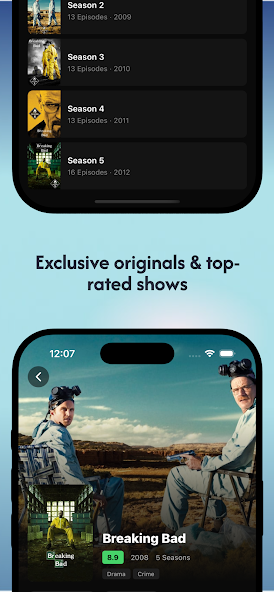

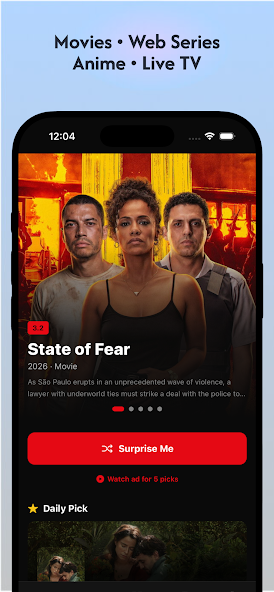
HDO Box APK is a third-party streaming application that has attracted attention from Android users looking for a simple way to browse and watch movies and TV shows. It is commonly discussed as an alternative to subscription-based entertainment platforms because of its movie-focused interface, built-in playback options, subtitles, source selection, and support for Android-based devices.
However, HDO Box APK is also surrounded by confusion about versions, download sources, compatibility, availability, and copyright. Different websites currently publish different version numbers and specifications. For example, one HDO Box information site lists version 4.4.5, while another site still lists version 3.0. This means users should verify the APK version and source carefully instead of assuming that every file advertised online is genuine.
This guide from appdroid.net explains what HDO Box APK is, how it works, its main features, supported devices, installation process, common problems, safety considerations, pros and cons, and alternatives.
What Is HDO Box APK?
HDO Box APK is an Android application package associated with a movie and TV-show streaming platform. Since APK means Android Package Kit, the term generally refers to installing the application manually rather than downloading it through Google Play.
HDO Box APK is designed around entertainment discovery and video playback. Available information describes features such as movie and TV-show categories, title information, episode selection, a built-in player, subtitle controls, quality selection, and multiple playback sources.
Unlike mainstream services such as Netflix or Disney+, HDO Box is generally distributed outside conventional app stores. That makes installation more flexible on compatible Android devices, but it also means users need to pay more attention to where the APK comes from.
HDO Box APK at a Glance
| Category | Details |
|---|---|
| App name | HDO Box |
| App type | Third-party entertainment/streaming app |
| Main platform | Android |
| Android support | Some current listings state Android 7.0 or newer |
| TV support | Android TV and Fire TV are commonly listed |
| Playback | Built-in player on current listings |
| Subtitles | Available where supported by the source |
| APK installation | Manual sideloading |
| PC support | Possible through compatible Android emulators |
| Cost | Availability and premium claims vary by source |
| Official app-store availability | Not generally distributed through Google Play |
| Current version information | Conflicting listings require verification |
The table is intentionally cautious because HDO Box information changes across websites and versions.
How Does HDO Box APK Work?
HDO Box works primarily as an entertainment browsing and playback application. The interface lets users find movies or TV shows, open a title page, select an episode when applicable, and start playback.
Some published HDO Box documentation describes several streaming sources for individual titles. If one source does not work, users may be able to select another available source. The same documentation also describes quality controls, subtitle settings, and built-in playback tools.
This source-based system is important because streaming reliability does not depend entirely on the application itself. Server availability, internet speed, regional restrictions, device compatibility, and the particular source being used can all affect playback.
It also explains why one user may experience smooth playback while another receives buffering, a missing source, or an error.
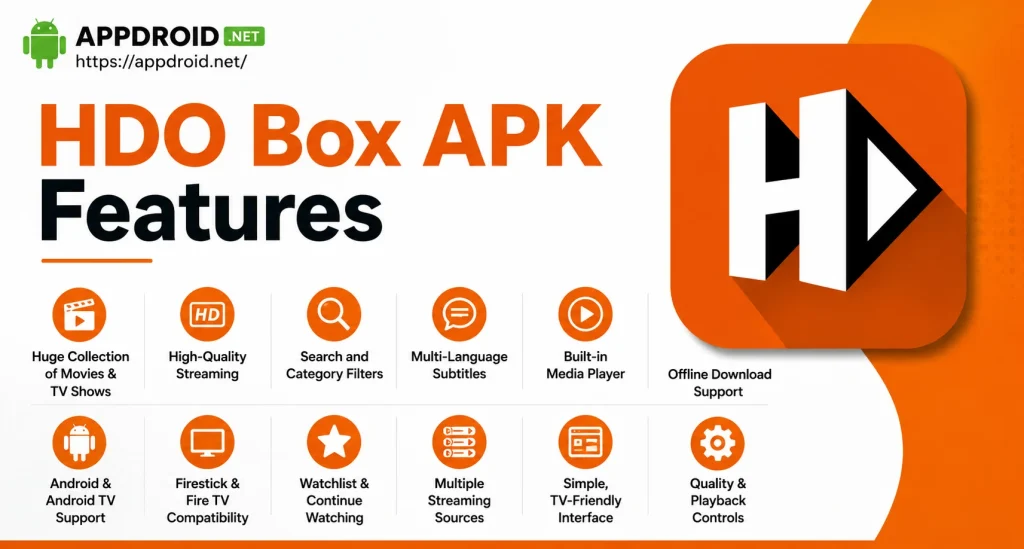
HDO Box APK Features
HDO Box is popular in discussions about third-party streaming apps because it combines several entertainment features in a relatively straightforward interface.
Large Movie and TV Library
HDO Box is designed around movies and television content. Users can browse titles through categories and search for specific entertainment.
The available catalog can change over time because third-party streaming applications may depend on external sources. Therefore, users should not assume that every movie or show will always be available.
Simple Interface
The interface focuses on browsing titles, opening information pages, and starting playback.
This makes the application relatively easy to understand for people who prefer a straightforward streaming layout instead of complicated menus.
Movie Details
Title pages can provide useful information before playback, including details about the movie or show.
Depending on the version and source, users may see information such as release year, genre, cast, rating, description, and episode details.
TV Shows and Episode Selection
HDO Box is not limited to individual movies. TV series can be organized into seasons and episodes, making it easier to continue a show.
Current HDO Box documentation specifically lists an episode selector and continue-watching functionality among the interface elements.
Built-In Media Player
One of the more useful features is the built-in player described by current HDO Box documentation.
A built-in player means users do not necessarily need to configure a separate media player before testing playback. Player controls may include fullscreen playback, quality selection, subtitle settings, and playback adjustments.
Multiple Streaming Sources
Some versions and guides describe multiple source links for a title.
This can be helpful when a particular server is unavailable. Instead of assuming that the entire application is broken, users can sometimes try another available source.
Quality Selection
Available playback quality depends on the source and title. Current HDO Box documentation claims support for resolutions up to 4K where available.
However, 4K availability should not be interpreted as a guarantee that every movie or show will stream in 4K.
Subtitle Support
Subtitle settings are another important part of the HDO Box experience.
Current documentation claims support for more than 30 subtitle languages, although the actual languages and availability can vary depending on the title and source.
Playback Controls
The player may provide controls for playback speed, zoom, subtitles, and other viewing preferences.
These options can be useful on both mobile screens and larger displays.
TV-Friendly Support
HDO Box information pages list Android TV, Fire TV, and Firestick among supported platforms.
TV compatibility can still vary depending on the hardware, Android version, APK build, remote-control support, and application version.
HDO Box APK Compatibility
HDO Box is primarily associated with Android devices, but its APK format allows it to be used on several Android-based platforms.
| Device | Compatibility | Notes |
|---|---|---|
| Android phone | Yes | APK installation is the primary use case |
| Android tablet | Yes | Depends on Android version and APK build |
| Android TV | Yes | TV navigation and device compatibility may vary |
| Fire TV | Commonly supported | Requires sideloading |
| Firestick | Commonly supported | Requires an APK installation method |
| Windows PC | Indirect | Requires a compatible Android emulator |
| Mac | Indirect | Requires compatible Android-emulation software |
| iPhone/iPad | No direct APK installation | APK files are Android packages |
Current HDO Box documentation lists Android 7.0 and newer for its current version information. It also distinguishes between arm64-v8a and armeabi-v7a builds.
HDO Box APK Version and File Size
One of the most important things to understand before installing HDO Box is that online version information is inconsistent.
A current HDO Box information site lists v4.4.5, with Android 7.0+ support and a 31 MB arm64-v8a build. It also lists a 29 MB armeabi-v7a build and a larger universal package.
At the same time, another website currently identifies v3.0 as its latest version and gives a different file size.
This discrepancy is a warning sign for users searching for “HDO Box APK latest version.” Different websites may be referring to different builds, mirrors, or releases.
Before installing any APK, check:
- Version number
- File size
- Android requirement
- CPU architecture
- Developer/source information
- Requested permissions
- File integrity
- Whether the page is genuinely associated with the application
Do not install an APK simply because a website labels it “latest” or “official.”
HDO Box APK Installation Guide for Android
Installing an APK manually is different from installing an application through Google Play.
Step 1: Check Your Android Version
First, check your phone or tablet’s Android version.
If the APK requires Android 7.0 or newer, an older device may not be compatible. Current HDO Box documentation lists Android 7.0+ for its newer build.
Step 2: Verify the APK Build
Modern 64-bit Android devices commonly use arm64-v8a packages.
Older devices may require armeabi-v7a. A universal APK can support both architectures but is usually larger. Current HDO Box download documentation lists separate v8a, v7a, and universal builds.
Step 3: Download From a Source You Trust
Before opening an APK, check its name, size, version, and source.
Avoid websites that repeatedly redirect you through suspicious pages or require unnecessary applications before providing the file.
Step 4: Allow APK Installation
Android may block applications installed outside Google Play.
You may need to allow your browser or file manager to install unknown applications. The exact setting depends on your Android version and device manufacturer.
After completing the installation, it is sensible to disable the permission again if you do not regularly sideload applications.
Step 5: Install the APK
Open the downloadedHDO Box APKand review the installation screen.
If the application requests permissions that do not appear necessary for its advertised functionality, stop and investigate before proceeding.
Step 6: Open and Configure the App
Once installed, open HDO Box and review its player, subtitle, and playback settings.
Start with a lower playback quality if you have a slower connection. You can increase the quality later if playback remains stable.
How to Install HDO Box on Android TV or Firestick
The basic process is similar, but TV devices generally require a sideloading method.
First, install a trusted file-downloading or file-management application that is available for your TV device. Then obtain the APK from a source you trust and allow the necessary installation permission.
After installation, open HDO Box and test navigation using your remote.
TV users should pay particular attention to:
HDO Box documentation specifically provides setup guidance for Android TV, Fire TV, and Firestick.
Can You Use HDO Box on a PC?
HDO Box is an Android APK, so Windows and Mac computers cannot normally install it like a native desktop application.
A compatible Android emulator can provide an Android environment on a computer. After installing a reputable emulator, users can install a compatible APK inside that environment.
Keep in mind that emulator performance depends on the computer’s processor, RAM, graphics capabilities, virtualization settings, and emulator configuration.
Can HDO Box APK Be Installed on iPhone?
No. An APK is an Android application package and cannot be installed directly on iPhone or iPad.
This is particularly important because some websites use phrases such as “HDO Box iOS APK” even though APK is an Android format.
Current HDO Box documentation also warns that APK files cannot be directly installed on iPhone or iPad.
Users should be cautious with websites that ask iPhone users to install unknown configuration profiles or suspicious “APK launchers.”
Is HDO Box APK Safe?
Safety is one of the biggest questions surrounding third-party APK applications.
Installing an APK outside an official app store carries additional risk because the file may have been modified, repackaged, or distributed by an unrelated third party.
The HDO Box website itself advises users to review file details, permissions, version information, and other installation details before installing an APK. Its disclaimer also notes that APK installation outside an app store may create device and privacy risks.
For safer APK installation, follow these practices:
- Download only from a source you have investigated.
- Check the APK version before installation.
- Compare the advertised file size with the actual file.
- Review requested permissions.
- Keep Android security protections enabled.
- Scan suspicious files before opening them.
- Do not provide unnecessary personal information.
- Avoid modified APKs claiming unlimited premium access.
- Remove the application if it behaves suspiciously.
No third-party APK should automatically be considered completely safe.
Is HDO Box Legal?
The legality of using HDO Box depends heavily on the content, source, and laws that apply in your location.
HDO Box APK information pages state that the website does not host media files and that users are responsible for complying with applicable laws and respecting copyright.
The important distinction is between the application itself and the content accessed through it.
Users should make sure they have the right to access or stream the content they select. If a movie or TV show is copyrighted and is being made available without proper authorization, accessing it may create legal issues depending on local law.
For that reason, appdroid.net recommends using legitimate services and authorized sources whenever possible.
Why Is HDO Box Not Working?
HDO Box users can experience several different problems.
Some recent reports and third-party guides indicate that HDO Box availability has been inconsistent in 2026. One August 2026 report said versions 2.4.1 and 1.1.2 installed but became stuck at “Initializing Player.”
At the same time, other HDO Box pages continue to publish newer APK information. This suggests that users may encounter different builds, domains, or versions rather than one consistent application state.
Common HDO Box Problems
| Problem | Possible Cause | What to Try |
|---|---|---|
| App will not install | Wrong APK architecture | Try the correct v7a/v8a build |
| App crashes | Compatibility problem | Check Android version and APK build |
| Initializing Player | Source/server issue | Restart app and try another available source |
| Buffering | Slow network or overloaded source | Lower quality or change source |
| No subtitles | Source does not provide them | Try another source/title |
| Video will not start | Broken source | Select another available source |
| App freezes | Cache or compatibility issue | Clear cache and restart |
| TV remote does not work well | TV optimization issue | Try a compatible build |
| APK unavailable | Domain/version changed | Avoid random mirrors and verify source |
How to Fix HDO Box Buffering
Buffering does not always mean the application is broken.
Start by checking your internet connection. If other streaming applications are also buffering, the network may be responsible.
You can also:
- Restart the application.
- Restart the router.
- Reduce video quality.
- Try another available playback source.
- Clear the application’s cache.
- Close other applications using bandwidth.
- Test the application again later.
Current HDO Box APK documentation recommends checking the source, cache, network, and playback quality when dealing with buffering.
HDO Box APK Pros and Cons

Pros
- Simple movie and TV-focused interface.
- Supports Android-based devices.
- Designed for both mobile and larger screens.
- Built-in player on current listings.
- Subtitle controls are available.
- Multiple playback sources may be available.
- Quality selection can be useful for different internet speeds.
- Android TV and Fire TV support is commonly documented.
- PC use is possible through Android emulation.
Cons
- It is generally distributed outside official app stores.
- APK safety depends heavily on the download source.
- Version information is inconsistent across websites.
- Playback sources can stop working.
- Buffering and server problems may occur.
- Compatibility differs between devices.
- iPhone users cannot directly install an APK.
- Content availability can change without notice.
- Copyright status of streamed material may vary.
- Some websites advertise modified or misleading versions.
HDO Box vs Official Streaming Services
HDO Box APK and established streaming platforms work very differently.
| Feature | HDO Box | Official Streaming Services |
|---|---|---|
| Distribution | Usually APK/sideloading | Official app stores |
| Subscription | Availability varies | Usually subscription or licensed free model |
| Content rights | Varies by source | Typically licensed |
| Device support | Android-focused | Usually broad |
| Updates | Can be inconsistent | Generally managed through app stores |
| Safety verification | Depends on source | More standardized |
| Account system | Depends on version | Usually established |
| Reliability | Can vary | Generally more predictable |
If reliability, official support, privacy, and licensed content are priorities, established streaming services are generally the safer choice.
HDO Box Alternatives
HDO Box users frequently search for alternatives because of playback problems, server availability, or changing APK versions.
Recent comparison articles mention applications and platforms such as Cinema HD, BeeTV, Nova TV, Viva TV, OnStream, Kodi, and legitimate services such as Plex and The Roku Channel.
The best alternative depends on what you want.
For a legitimate and more predictable experience, consider official platforms and media-center applications that clearly identify their content sources.
For users who prefer a customizable media-center experience, Kodi is another frequently mentioned option, although its functionality depends on how it is configured.
Should You Download HDO Box APK?
Whether HDO Box APKis appropriate depends on your device, expectations, and the source of the APK.
The biggest reason to be cautious in 2026 is the conflicting information surrounding current versions and availability. Some sites report newer builds while other reports indicate that particular versions have stopped working.
If you decide to use HDO Box, verify the APK carefully, avoid suspicious mirrors, review permissions, and keep your device protected.
For users who prioritize reliability and legal access to movies and TV shows, an established streaming platform remains the better long-term option.
Frequently Asked Questions About HDO Box APK
Final Verdict
HDO Box APK remains a widely discussed third-party entertainment application because of its simple interface, movie and TV-show browsing, built-in playback, subtitles, source selection, and support for Android-based devices.
However, the current HDO Box landscape requires more caution than simply searching for an APK and installing the first result. Different websites currently publish conflicting version numbers, while recent reports indicate that some older versions have experienced serious playback or availability problems.
For appdroid.net readers, the most important advice is to verify the APK version, check compatibility, review permissions, avoid suspicious mirrors, and understand the copyright implications of any content accessed through a third-party streaming application.
If your priority is a convenient entertainment interface, HDO Box APK may look attractive. If your priority is long-term reliability, security, official support, and clearly licensed content, an established streaming platform is generally the more dependable choice.
