

JioSphere APK Download Latest Version 2026
JioSphere APK offers fast browsing, smooth navigation, private browsing, multiple tabs, and useful features for a convenient Android experience. Don’t Wait Download now!
Category: Browser
Version
v7.0.1
Size
207MB
Android
10.0+
Update Date
18 – Aug – 26
Screenshots:


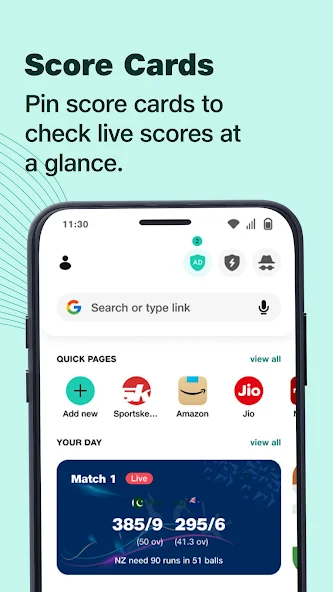
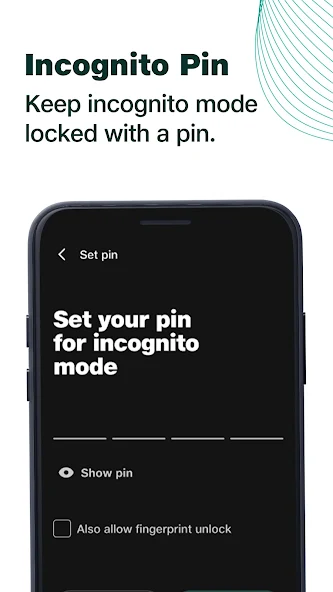


JioSphere Browser is a fast, secure, and India-focused web browser developed by Reliance Jio for mobile users across the country. It is built to deliver a smooth browsing experience on entry level and mid range Android devices, including Jio phones and other smartphones. The browser combines web browsing, search, news, entertainment, downloads, and privacy tools inside a single lightweight application that works on slow networks as well.
The app works by using a customized rendering engine that loads pages quickly while consuming less mobile data and battery power. JioSphere supports multiple regional Indian languages so users can read, search, and browse comfortably in their mother tongue. It also integrates Jio services directly inside the browser, which makes it a complete daily driver for millions of Jio subscribers who want everything in one place.
Why Choose JioSphere as Your Everyday Web Browser?
Choosing JioSphere as your everyday web browser gives you a balance of speed, privacy, and entertainment that very few browsers match in the Indian market. The browser is designed to handle slow 4G and patchy network conditions, which makes it ideal for users in tier 2 and tier 3 cities. It also brings built-in tools like VPN, ad blocker, news reader, and download manager, so you do not need to install extra apps for routine tasks.
Another strong reason to pick JioSphere APK is its tight integration with Jio apps, JioSaavn, JioTV, JioCinema, and JioMart. You can recharge, pay bills, watch content, and shop without leaving the browser window. The clean interface, lightweight design, and free data offers on the Jio network make it a smart choice for anyone who wants a single app for browsing, entertainment, and daily services.
Explore the Key Features of JioSphere Web Browser
JioSphere comes packed with a long list of useful features that go far beyond simple web browsing. Below are the 10 most powerful features of JioSphere Browser that every user should know about.

Top 10 Features of JioSphere Browser
These features make JioSphere Web Browser a strong competitor to Chrome, Samsung Internet, and UC Browser in the Indian mobile market.
Customizable Home Screen
The customizable home screen allows users to personalize their browsing experience with themes, shortcuts, and useful widgets. It provides quick access to frequently visited websites and preferred browser features.
News and Entertainment Hub
The News and Entertainment Hub brings news, cricket updates, videos, and other entertainment content into one convenient place. Users can quickly discover popular content without opening multiple websites or applications.
Data Saver Mode
Data Saver Mode reduces mobile data consumption by optimizing and compressing webpage content. It can be especially useful for users with limited data packages or slower mobile connections.
Anti-Tracking Protection
Anti-Tracking Protection helps block third-party trackers that may monitor browsing activity across websites. This feature adds another privacy layer and helps reduce unwanted tracking while browsing the internet.
Smart Download Manager
The Smart Download Manager helps organize downloaded files and supports resume functionality for interrupted downloads. Users can manage different files more easily without relying on a separate download application.
Voice Search
Voice Search lets users search the web by speaking instead of typing their queries manually. Its speech recognition feature can make searches faster and more convenient, especially when typing is difficult.
Regional Language Support
The browser supports multiple regional languages, including Hindi, Tamil, Telugu, Bengali, Marathi, and more. This makes navigation and web browsing easier for users who prefer their local language.
Ad Blocker
The built-in Ad Blocker removes many intrusive advertisements, popups, and unwanted web elements. This can make webpages cleaner, reduce distractions, and improve the overall browsing experience.
Incognito Mode
Incognito Mode prevents the browser from saving your browsing history, cookies, and form data after the session ends. It is useful when you want to browse privately or use a shared device without leaving local browsing records.
Built-in Free VPN
The built-in free VPN helps provide a more private browsing experience while using public or unsecured networks. It can help hide your IP address and add an extra layer of privacy during everyday browsing.
How JioSphere Protects Your Privacy and Online Securit
JioSphere takes user privacy seriously by offering multiple layers of security right inside the browser settings. The built-in VPN encrypts your internet traffic and hides your real IP address from websites and advertisers. Anti-tracking tools block hidden scripts that try to follow you across different websites and build a profile of your behavior.
The browser also gives you control over cookies, site permissions, camera access, microphone access, and location sharing. You can clear browsing data in one tap, block popups, and enable safe browsing warnings for harmful sites. With these tools combined, JioSphere offers a safe and private browsing experience that matches the standards of premium global browsers.
How to Personalize Your JioSphere Browsing Experience
Personalizing JioSphere is simple and can be done in just a few taps from the main menu. You can change the home page layout, add your favorite websites as speed dial shortcuts, and pick a custom theme that matches your style. The browser also supports dark mode, light mode, and system based theme switching for comfortable reading at any time of the day.
You can also customize the search engine, default download folder, font size, and text scaling for better readability. JioSphere allows regional language home pages so users who prefer Hindi, Tamil, or other Indian languages can set their preferred language as default. These small customization options make the browser feel truly yours from the moment you open it.
How JioSphere Incognito Mode Keeps Your Browsing Private
Incognito Mode in JioSphere is a private browsing window that does not save your history, cookies, cache, or form entries once you close the tab. It is perfect for shopping for gifts, logging into another account, or searching for sensitive topics without leaving a trace on your device. The incognito tab is clearly marked with a dark theme and a mask icon so you always know you are browsing privately.
When you close all incognito tabs, JioSphere automatically clears local data linked to that session so the next user of the phone cannot see what you searched. However, it is important to remember that your internet provider, employer network, or the websites you visit may still see your activity. Incognito protects you from local snooping, not from network level monitoring.
How JioSphere VPN and Anti-Tracking Features Improve Security
The built-in VPN in JioSphere routes your connection through a secure server, which masks your real IP address and location from the websites you visit. This makes it harder for advertisers, hackers, and data brokers to track you across the internet. The VPN is free to use inside the browser, which is a big advantage over paid VPN apps that charge monthly fees.
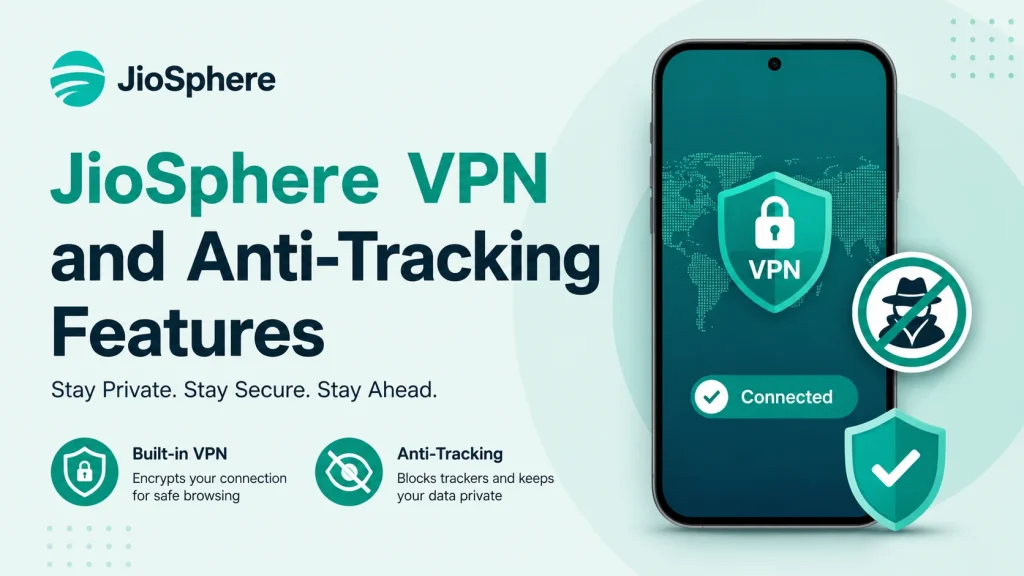
Anti-tracking protection works alongside the VPN by blocking invisible scripts, fingerprinting attempts, and third party cookies that follow you between websites. Together, these features give you a cleaner, faster, and more private browsing experience. You can toggle VPN and tracking protection independently from the privacy menu, depending on your current need.
JioSphere Search, Voice Search, and Regional Language Support
JioSphere offers multiple search options including a default search bar, voice search, and regional language search for Indian users. The voice search feature lets you speak your query instead of typing, which is helpful when you are on the move or have limited time. It understands English as well as several Indian languages and accents with impressive accuracy.
The browser also supports reading and searching in Indian regional languages like Hindi, Bengali, Tamil, Telugu, Kannada, Malayalam, Gujarati, Marathi, Punjabi, and Odia. This makes it a great choice for first time smartphone users who are more comfortable in their native language. You can switch languages anytime from the settings and even translate full web pages with a single tap.
JioSphere Download Manager and Built-In Browsing Tools
The download manager in JioSphere is fast, reliable, and supports resume on broken connections, which is very useful on mobile networks. You can download images, videos, PDFs, APKs, and documents directly from the browser with a single tap. The downloaded files are neatly organized into categories like images, videos, documents, and archives so you can find them easily later.
Along with downloads, the browser also offers a built-in file viewer, image viewer, and PDF reader so you do not need a separate app for opening saved content. You can also take screenshots, share pages via WhatsApp and other apps, and save articles for offline reading. These small but useful tools turn JioSphere into a complete productivity companion for mobile users.
Enjoy Videos, Games, and Entertainment With JioSphere
JioSphere doubles as an entertainment hub thanks to its deep integration with Jio platforms like JioCinema, JioTV, and JioSaavn. You can stream movies, live cricket matches, TV shows, and music videos directly from the browser without installing separate apps. The home screen also features trending news, viral videos, and short reels curated for Indian audiences.
There is also a games section inside JioSphere where you can play casual and hyper casual games without downloading heavy game files. This is perfect for users who want quick entertainment during travel or short breaks. Combined with the entertainment features, the browser delivers a true all in one experience for daily users.
Which Devices and Platforms Support JioSphere Browser?
JioSphere Browser is available on Android smartphones, Android tablets, and Jio feature phones through the Google Play Store and Jio App Store. It is optimized to run smoothly on devices with as little as 1 GB of RAM, which makes it ideal for budget smartphones. The browser also works well on entry level JioPhone models that run on KaiOS or Android Go.
Currently, JioSphere is focused mainly on Android and is the primary browser experience for millions of Jio users. An iOS version may roll out in the future, but as of now the browser is not officially available for iPhones and iPads. Windows and macOS versions are also not available, so the browser is purely a mobile first product for the Indian audience.
What Makes JioSphere Different From Other Web Browsers?
JioSphere stands out from other browsers because it is built specifically for Indian users, Indian languages, and Indian network conditions. While Chrome, Firefox, and Edge are designed for global users, JioSphere focuses on regional content, Jio services, and low data usage. This makes it feel more local, more relevant, and more useful for the average Indian smartphone user.
Another big difference is the integration of VPN, ad blocker, and entertainment apps inside a single free browser. Most premium browsers charge for VPN access, while JioSphere offers it at no extra cost. Add regional language support, free Jio offers, and a lightweight design, and you get a browser that is genuinely different from the competition.
JioSphere Browser vs Other Popular Browsers
Here is a quick comparison of JioSphere Browser with Chrome, Samsung Internet, and UC Browser to help you decide which one fits your needs best.

| Feature | JioSphere Browser | Google Chrome | Samsung Internet | UC Browser |
|---|---|---|---|---|
| Built in VPN | Yes, Free | No | No | No |
| Regional Language Support | Yes, 10 plus | Limited | Limited | Yes |
| Ad Blocker | Yes | Limited | Yes | Yes |
| Data Saver Mode | Yes | Yes | Yes | Yes |
| Jio Service Integration | Yes, Full | No | No | No |
| Lightweight on Low RAM | Yes, Very Light | Heavy | Moderate | Light |
| Free to Use | Yes | Yes | Yes | Yes |
| Best For | Indian Jio Users | Global Users | Samsung Users | Budget Users |
From this table it is clear that JioSphere offers more value for Jio users while still being a strong general purpose browser for everyone.
How to Download and Install JioSphere Browser
Downloading JioSphere is quick and simple and can be done from the Google Play Store on any Android device. You can also install it from the Jio App Store if you are a Jio subscriber using a Jio phone or Jio SIM. The APK file size is small, so the installation completes in less than a minute even on slow networks.
Steps to Install JioSphere Browser
Once installed, JioSphere is ready to use as your default browser for daily browsing, downloads, and entertainment.
How to Update JioSphere to the Latest Version
Keeping JioSphere updated is important to enjoy the latest features, security patches, and performance improvements. Updates usually bring new privacy tools, better ad blocking, and smoother page loading. Most updates are small in size and install within seconds.
You can update the browser in two simple ways. First, enable auto update from the Play Store so the browser updates itself in the background whenever a new version is released. Second, you can manually open the Play Store, search for JioSphere, and tap the Update button if a new version is available. Updating regularly keeps your browser safe, fast, and bug free.
Pros and Cons
Like every browser, JioSphere has its strengths and weaknesses that users should know before making it their default browser.

Pros
- Free built-in VPN with no usage limit
- Strong regional language support for Indian users
- Lightweight design that works on budget phones
- Ad blocker and anti-tracking protection included
- Smooth Jio service integration for recharge, bills, and shopping
- Free data offers for Jio subscribers inside the app
- Clean and simple user interface for beginners
Cons
- Available only on Android, no iOS or desktop version
- Some advanced extensions are missing compared to Chrome
- Limited sync options across multiple devices
- Occasional slow loading on very heavy websites
- Entertainment section may feel limited outside India
- Search results sometimes depend on Jio partnerships
Overall, the pros of JioSphere clearly outweigh the cons for Indian mobile users who want speed, privacy, and entertainment in one app.
Is JioSphere Browser Safe to Use?
Yes, JioSphere Browser is safe and private for everyday browsing when you use it with the built-in privacy features turned on. The VPN, ad blocker, anti-tracking tools, and incognito mode work together to give you strong protection on public Wi-Fi and mobile networks. The browser is developed by Reliance Jio, one of the largest telecom operators in India, which adds a layer of trust and accountability.
That said, no browser is 100 percent perfect, and you should still avoid entering sensitive passwords on unknown websites and keep the app updated. Use the VPN on public Wi-Fi, turn on anti-tracking, and clear cookies regularly for the best privacy experience. With smart usage, JioSphere is one of the safest browsers available in India today.
Frequently Asked Questions About JioSphere Browser
Final Verdict on JioSphere Web Browser
JioSphere Web Browser is a powerful, privacy focused, and India first browser that delivers excellent value for both Jio and non Jio users. It combines speed, security, regional language support, free VPN, ad blocking, and entertainment inside a single lightweight app. For users who want a smart alternative to Chrome and Samsung Internet, JioSphere is a genuine and reliable choice.
If you are looking for a fast, secure, and feature rich mobile browser that understands Indian users, JioSphere deserves a place on your phone. Download it today, enable the privacy tools, and enjoy a cleaner, safer, and more entertaining browsing experience every single day.
