

MEGA APK Download Latest Version for Android
Download MEGA APK free for Android. Get 20 GB free storage with end-to-end encryption, plus the truth about the 50 GB offer and fixes for transfer limits.
Category: Cloud Storage
Version
v16.11.1
Size
112 MB
Android
9.0+
Update Date
18 – 8 – 26
Screenshots:
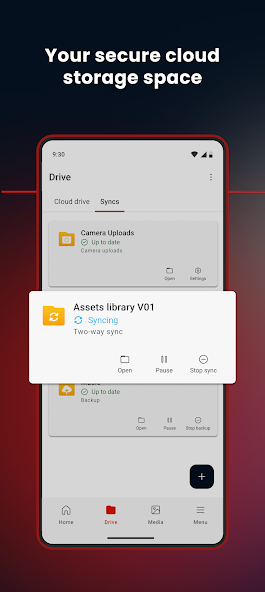

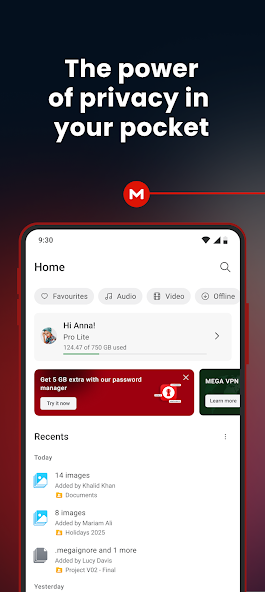
MEGA is a cloud storage app that gives you 20 GB of permanent free storage with end-to-end encryption switched on by default. The MEGA APK runs on Android 5.0 and above and takes under two minutes to install. You can get the current build from APPDROID.NET and start uploading straight away.
One number needs clearing up before anything else. Signup screens and download pages across the web advertise 50 GB free, and that figure is misleading. Only 20 GB is permanent, and the guide below explains exactly what happens to the rest.
The app’s real strength is privacy. Files are scrambled on your device before they ever leave it, which means the company itself cannot read what you store. Very few free cloud services offer that, and none of the big names do.
MEGA APK File Details
| Detail | Information |
|---|---|
| App Name | MEGA |
| Package Name | com.mega.apk |
| Latest Version | 16.11.1 |
| Developer | MEGA Limited |
| Category | Productivity / Tools |
| Android Requirement | Android 5.0 or higher |
| Free Storage | 20 GB permanent |
| Encryption | Zero-knowledge, default |
| Servers | New Zealand / Europe |
| Price | Free Premium Unlocked |
What Is MEGA?
MEGA latest APk is a cloud storage and file sharing service built around encryption rather than storage size. Files upload to servers in New Zealand and Europe, and you reach them from any device. The Android app handles uploads, camera backup, sharing, and chat from a single interface.
What sets it apart is the encryption model. Your files are encrypted on your phone using a key that only you hold, so the company stores scrambled data it cannot open. This is called zero-knowledge encryption, and it changes what the service is safe to hold.
How Does MEGA Work?
The app generates an encryption key tied to your password when you create an account. Every file gets scrambled with that key before upload. Anyone you share with receives a decryption key inside the link, which is why MEGA links look longer than most.
Who Owns MEGA?
MEGA Limited operates the service and is based in New Zealand. That jurisdiction sits outside both American and Chinese data frameworks. For anyone weighing privacy, this is a meaningful difference from the larger providers.
MEGA Free Storage: Why It Says 50 GB but Gives 20 GB
This is the single most misreported fact about the app, and almost every download page repeats the wrong number. Here is what actually happens to your storage.
What You Get at Signup
A new account shows roughly 50 GB available on day one. That figure is genuine at that moment, which is why so many pages quote it. It does not stay that way.
The 30-Day Trial Bonus
Around 30 GB of that total is a temporary welcome bonus. It runs for 30 days from account creation and then disappears. Nothing you do can extend it beyond that window.
What Happens When the Bonus Expires
Your allowance drops to 20 GB at the end of the trial. Files above that line are not deleted, but your account moves into an over-quota state until you free up space or upgrade. Uploads pause while you sit over the limit.
How Much Storage Is Actually Permanent
| Storage Type | Amount | Duration |
|---|---|---|
| Base free storage | 20 GB | Permanent |
| Welcome bonus | ~30 GB | 30 days |
| Advertised total | ~50 GB | Misleading |
Plan around the 20 GB figure and treat anything above it as temporary. That is still the largest permanent free tier of any major provider apart from TeraBox.
MEGA Transfer Quota Explained
Storage is only half the story on a free MEGA account. The transfer quota trips up far more people than the storage cap does, and hardly anyone explains it.
What Counts Toward Your Quota
Downloads count against your quota, whether you pull your own files or open someone else’s shared link. Uploads are treated separately and are far less restricted. Streaming a video from your account counts as a download.
What Happens When You Hit the Limit
Transfers stop and the app shows a quota message. You cannot download anything further until the window resets. Uploading generally still works while downloads are blocked.
How the Quota Resets
The limit runs on a rolling window rather than a calendar month. Waiting a few hours usually restores partial capacity. Pro accounts get far higher quotas or none at all.
Key Features of MEGA
20 GB Permanent Free Storage
Twenty gigabytes is the largest permanent free tier among mainstream encrypted providers. It comfortably beats Google Drive at 15 GB, OneDrive at 5 GB, and Dropbox at 2 GB. Only TeraBox offers dramatically more, and it offers no encryption at all.
Zero-Knowledge Encryption
Every file is encrypted before it leaves your device, with no setting to enable and no add-on to buy. The company holds scrambled data and no key. This applies to the free plan exactly as it does to paid ones.
Automatic Camera Upload
New photos and videos copy to your account as you capture them. You can restrict this to Wi-Fi so it never touches mobile data. Encryption applies to backed-up files the same as manual uploads.
Secure File Sharing with Links
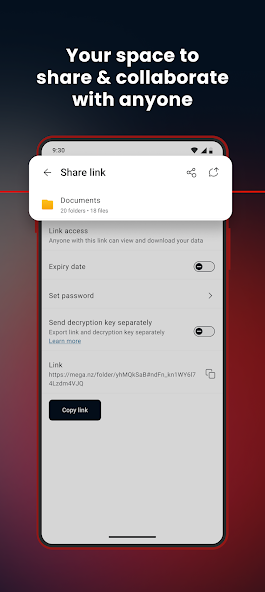
Shared links carry the decryption key, which is why they run long. You can also share a link and send the key separately for tighter control. Links can be revoked at any time from the app.
File Versioning and Rubbish Bin
Previous versions of edited files are retained, so you can roll back mistakes. Deleted items sit in a rubbish bin before permanent removal. Both features work on the free plan.
What Zero-Knowledge Encryption Actually Means
This term appears on a lot of marketing pages and gets used loosely, so it is worth being precise.
How MEGA Encrypts Your Files
Encryption happens on your phone before upload, using a key derived from your password. The servers receive data that is already scrambled. No employee, court order, or breach of MEGA’s systems can reveal your file contents.
Why You Must Not Lose Your Recovery Key
The trade-off is severe and permanent. Losing your password without your Recovery Key means your files are unrecoverable, because nobody else holds a copy of the key. Export your Recovery Key during setup and store it somewhere safe.
Which Apps Offer This Free
| App | Zero-Knowledge on Free Plan |
|---|---|
| MEGA | Yes |
| Sync.com | Yes |
| Internxt | Yes |
| pCloud | Paid add-on only |
| Icedrive | Paid add-on only |
| Google Drive | No |
| Dropbox | No |
| TeraBox | No |
MEGA Free vs Pro Plans
| Feature | Free | Pro |
|---|---|---|
| Storage | 20 GB | 2 TB and up |
| Transfer Quota | Limited | High or unlimited |
| Encryption | Zero-knowledge | Zero-knowledge |
| File Versioning | Yes | Extended history |
| Ads | No | No |
| Priority Support | No | Yes |
System Requirements
| Requirement | Minimum | Recommended |
|---|---|---|
| Android Version | 5.0 | 8.0 or newer |
| RAM | 2 GB | 4 GB or more |
| Free Storage | 150 MB | 500 MB |
| Internet | Stable 4G | 5G or Wi-Fi |
How to Download and Install MEGA APK on Android
- Open your browser and visit APPDROID.NET.
- Tap the MEGA APK Download button on the page.
- Wait for the file to finish downloading.
- Open your settings and allow installs from unknown sources for your browser.
- Tap the downloaded file and choose Install.
- Launch the app and create an account with your email address.
- Export your Recovery Key when prompted and save it somewhere safe.
Step seven is the one people skip and later regret. Without that key, a forgotten password locks you out of your own files permanently.
How to Use MEGA
- Tap the plus icon to upload files, photos, or a whole folder.
- Open Settings and switch on Camera Uploads.
- Long-press any file and choose Get Link to share it.
- Choose whether to include the decryption key in the link or send it separately.
Files marked for offline use stay readable without a connection. Deleted items move to the rubbish bin, so mistakes stay recoverable for a period.
Is MEGA Safe?
MEGA is among the safest mainstream cloud apps for personal files, largely because of the encryption model. The company cannot read your data even if compelled to try.
Where Your Files Are Stored
Servers sit in New Zealand and Europe, outside both US and Chinese data frameworks. New Zealand privacy law is comparatively strong. For sensitive personal documents this is a genuine advantage over most competitors.
What Happens If You Lose Your Password
Account recovery depends entirely on your Recovery Key. Without it, encrypted files cannot be restored by anyone, including MEGA support. Save the key at signup and store it away from your phone.
MEGA vs TeraBox
| Feature | MEGA | TeraBox |
|---|---|---|
| Free Storage | 20 GB | 1 TB |
| Encryption | Zero-knowledge | None |
| Ads on Free | No | Yes |
| Download Speed | Transfer quota | Throttled |
| Servers | NZ / Europe | China / Singapore |
| Max File Size | No fixed limit | 4 GB |
| Best For | Private files | Large archives |
TeraBox wins on space by a factor of fifty and loses on everything privacy related. MEGA is where sensitive material belongs. Running both covers each use case properly.
Pros and Cons of MEGA
| Pros | Cons |
|---|---|
| 20 GB permanent free storage | Advertised 50 GB is misleading |
| Zero-knowledge encryption free | Transfer quota limits downloads |
| No ads on the free plan | Lost password means lost files |
| No fixed file size limit | Fewer integrations than rivals |
| New Zealand jurisdiction | Sharing needs the recipient’s cooperation |
| File versioning included | Smaller free tier than TeraBox |
MEGA Not Working? Common Errors and Fixes
Transfer Quota Exceeded
- Wait for the rolling window to reset, usually a few hours.
- Upload instead of downloading in the meantime.
- Upgrade to Pro if you hit the limit regularly.
Upload Failed
- Check that your connection is stable.
- Confirm you are not over your storage quota.
- Retry over Wi-Fi rather than mobile data.
Login or Two-Factor Error
- Confirm your email address is verified.
- Check your authenticator app clock is in sync.
- Use your Recovery Key if the password is lost.
Camera Upload Not Working
- Confirm Camera Uploads is switched on in settings.
- Grant the app full photo and media permissions.
- Turn off battery optimisation for MEGA.
Slow Download Speed
- You may be approaching your transfer quota.
- Close background apps competing for bandwidth.
- Switch from mobile data to Wi-Fi.
App Crashing on Android
- Update to the newest version.
- Clear the app cache from your device settings.
- Reinstall if crashes persist after clearing cache.
Best Alternatives to MEGA
Internxt and Sync.com both offer zero-knowledge encryption free, though with much smaller allowances. pCloud gives 10 GB free with lifetime plans, but encryption costs extra. TeraBox is the pick when raw storage size matters more than privacy.
For most people the practical setup is two services. Keep private material on MEGA and bulk media somewhere with a larger free tier.
Frequently Asked Questions
Final Verdict
MEGA is the best free cloud storage app on Android for anyone who cares about privacy. Twenty gigabytes of permanent storage with zero-knowledge encryption at no cost is an offer no major competitor matches. The app runs without ads and imposes no fixed file size limit.
Two things hold it back. The 50 GB advertised at signup collapses to 20 GB after thirty days, and the transfer quota can stop downloads mid-task. Neither is hidden once you know to look for them, which is exactly why they belong near the top of this page rather than the bottom.
Get the current build and full specifications from APPDROID.NET, updated whenever a new version ships.
