

Phoenix Browser Download APK (Official) 2026
Download Phoenix Browser APK 2026 for fast browsing, privacy protection, ad blocking, smooth performance, and the latest features on Android devices.. Don’t Wait Download now!
Category: Browser
Version
v22.0.3.6695
Size
24.22 MB
Android
7.0+
Update Date
18 – Aug – 26
Screenshots:


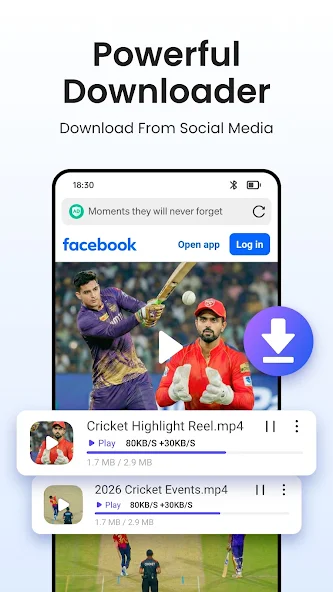

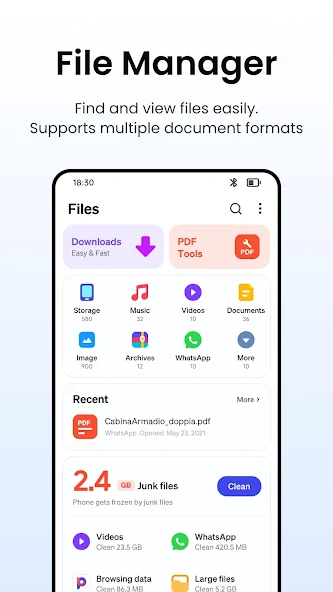
Phoenix Browser is designed for users who value speed, privacy, and storage efficiency on their Android phones. Unlike heavy browsers like Chrome or Firefox, Phoenix consumes very little RAM and battery, making it ideal for older or budget smartphones. The built-in ad blocker removes annoying pop-ups and banners, while the data saver feature reduces mobile internet usage by up to 90 percent. For users concerned about online tracking, the private browsing mode ensures that no history, cookies, or cache files are saved after the session ends.
Phoenix Browser APK Latest Version Features
The latest version of Phoenix Browser comes packed with powerful features that make everyday browsing easier and faster. Below is a list of the top 10 Phoenix Browser features that every Android user should know about.
Top 10 Features of Phoenix Browser APK
Built-in Free VPN
Phoenix Browser includes a built-in free VPN that helps protect your browsing activity on public or unsecured networks. It adds an extra layer of privacy while you access websites and online content. This feature is useful for users who want more private browsing without installing another VPN app.
Incognito Mode
The Incognito Mode lets you browse without saving your browsing history, cookies, or form data on the device. It is helpful when you are using a shared phone or want to keep certain browsing sessions private. Once the private session ends, its local browsing information is not retained.
Ad Blocker
Phoenix Browser comes with an ad blocker that helps reduce intrusive advertisements and annoying popups. Blocking unwanted ads can make webpages cleaner and easier to navigate. It can also help improve the overall browsing experience on ad-heavy websites.
Regional Language Support
The browser supports regional languages such as Hindi, Tamil, Telugu, Bengali, and Marathi. This makes menus and browsing features easier to understand for users who prefer local languages. It provides a more comfortable experience for a wider range of Android users.
Voice Search
Voice Search allows users to search the web using spoken commands instead of typing. Its speech recognition feature can make searches faster, especially when entering long queries. It is also convenient when you are using your phone while multitasking.
Smart Download Manager
The Smart Download Manager helps organize downloaded files and supports download resuming when an interrupted download continues. Files can be easier to manage through categories and a dedicated download section. This makes downloading videos, documents, and other files more convenient.
Anti-Tracking Protection
Phoenix Browser provides Anti-Tracking Protection to help limit tracking from third-party sources. This can reduce unwanted tracking activity while you browse different websites. It gives users greater control over their online browsing privacy.
Data Saver Mode
The Data Saver Mode is designed to reduce mobile data consumption by compressing webpage content. It can be useful for users with limited data packages or slower connections. Using less data can also make webpages load more efficiently in certain situations.
Customizable Home Screen
The Customizable Home Screen lets users personalize their browsing page with themes, shortcuts, and widgets. You can arrange frequently visited websites and useful tools for quicker access. This makes the browser feel more personal and keeps important shortcuts within easy reach.
Fast Browsing and Smooth Web Surfing With Phoenix Browser
Phoenix Browser uses an optimized rendering engine that ensures web pages load quickly even on slower internet connections. The browser preloads content in the background and applies smart compression techniques to reduce page size without losing quality. Users on 3G and 4G networks will notice significantly faster page loads compared to traditional browsers. The smooth scrolling and responsive design make Phoenix Browser a pleasure to use for everyday web surfing.
Built-In Video Downloader and Video Player
One of the most loved features of Phoenix Browser is its integrated video downloader that lets users save videos directly from the internet. You can download videos from popular platforms and social media sites with just a few taps, without needing any third-party app. The browser also includes a built-in video player that supports multiple formats, so you can watch your downloaded content instantly. This makes Phoenix Browser a complete entertainment tool for Android users who love saving videos for offline viewing.
Powerful Download Manager and File Manager
Phoenix Browser comes with a robust download manager that supports multiple file types including images, videos, documents, and APK files. All your downloads are organized in a single place, making it easy to find, open, or delete files. The file manager feature allows you to browse, rename, move, and delete files stored on your device storage. This combination saves users from installing separate file management apps on their Android phones.
Ad Blocker for a Cleaner Browsing Experience
The built-in ad blocker in Phoenix Browser removes banner ads, pop-ups, video ads, and other intrusive advertising content automatically. By blocking ads, the browser not only makes web pages cleaner but also loads them faster since fewer resources are needed to render content. Users can enjoy a distraction-free browsing experience that protects them from malicious ads and clickbait. This feature alone makes Phoenix Browser APK stand out from many competing Android browsers.

Private Browsing and Incognito Mode
Privacy is a top priority for many Android users, and Phoenix Browser delivers with its secure incognito mode. When private browsing is enabled, the browser does not save your history, cookies, search queries, or form data. This ensures that no one using your phone can see what websites you visited or what you searched for online. Combined with the ad blocker, private browsing in Phoenix Browser provides a truly anonymous and secure web experience.
WhatsApp Status Saver for Photos and Videos
Phoenix Browser offers a unique WhatsApp status saver tool that allows you to download status photos and videos shared by your contacts. This feature works without requiring any root access or additional permissions beyond what the app already uses. Users can browse through their contacts’ statuses and save the ones they like with a single tap. The status saver is one of the most popular features among Phoenix Browser users in 2026.
Multi-Tab Browsing and Smart Tab Management
The browser supports multi-tab browsing that allows you to open multiple websites at the same time and switch between them easily. Phoenix Browser also includes a smart tab manager that groups related tabs and offers quick switching options. Users can close all tabs at once, restore recently closed tabs, or open links in background tabs for later reading. This makes multitasking simple and efficient for users who often work with multiple websites open.
Multiple Search Engines and Desktop Mode
Phoenix Browser gives users the freedom to choose from multiple search engines including Google, Bing, Yahoo, and DuckDuckGo. You can set your default search engine based on your personal preference for better results. The browser also offers a desktop mode that loads the full version of websites instead of mobile versions, which is useful for accessing certain features not available on mobile. Switching between mobile and desktop mode takes just one tap in the browser settings.
Phoenix Browser APK Specifications and System Requirements
Before downloading Phoenix Browser, it is important to check whether your device meets the minimum requirements. Below is a table showing the complete specifications of Phoenix Browser APK.
Phoenix Browser APK Technical Details
| Specification | Details |
|---|---|
| App Name | Phoenix Browser |
| Package Name | com.transsion.phoenix |
| Latest Version | 6.0.0 (Updated 2026) |
| File Size | Approximately 12 MB |
| Developer | Phoenix Studio |
| Category | Communication and Browsing |
| Required Android Version | Android 5.0 and above |
| License | Free |
| Languages Supported | 30 plus languages |
| In-App Purchases | No |
| Root Required | No |
How to Download Phoenix Browser APK on Android
Downloading Phoenix Browser APK is a simple process that takes just a few minutes. The first step is to enable installation from unknown sources in your Android settings under the security or privacy section. Next, you need to download the latest Phoenix Browser APK file from a trusted source. Once the download is complete, the APK file will be saved in your device’s downloads folder, ready for installation.

How to Install Phoenix Browser APK Step by Step
How to Use Phoenix Browser on Android
Using Phoenix Browser is very straightforward, even for users who are new to Android browsers. After opening the app, you will see a clean home screen with a search bar and quick access shortcuts to popular websites. You can type a URL directly into the address bar or use voice search for hands-free browsing. The settings menu allows you to customize the browser, change the default search engine, enable data saver, and configure privacy options according to your needs.
How to Download Videos and Files With Phoenix Browser
Downloading videos with Phoenix Browser is one of the most useful features of this app. To download a video, simply open the website that contains the video and play it in the browser. A download icon will appear on the screen, which you can tap to save the video to your device. The download manager keeps track of all your downloads and lets you pause, resume, or delete them at any time.
Phoenix Browser Privacy and Security Explained
Phoenix Browser takes user privacy seriously by offering multiple layers of protection for safe web browsing. The browser includes HTTPS encryption support that ensures your connection to websites is secure and protected from hackers. The built-in ad blocker also prevents malicious ads from loading on websites, reducing the risk of accidental clicks on harmful content. Combined with private browsing mode, Phoenix Browser offers a strong privacy framework for everyday Android users.
Phoenix Browser Permissions and Data Safety
Like all Android browsers, Phoenix Browser requires certain permissions to function properly on your device. The app requests access to storage for saving downloads, camera access for QR code scanning, and location access for location-based search results. Phoenix Browser does not collect personal data beyond what is necessary for the app to work, and it does not sell user information to third parties. The data safety policy of the browser is transparent and aligned with modern privacy standards.
Pros and Cons
Every app has its strengths and weaknesses, and Phoenix Browser is no exception. Below is a quick overview of the pros and cons of Phoenix Browser to help you decide whether it is the right choice for you.

Pros
- Lightweight and fast with a small app size
- Built-in video downloader that works on most websites
- Powerful ad blocker for cleaner browsing
- Data saver mode that reduces mobile data usage
- Private browsing mode for anonymous surfing
- WhatsApp status saver for saving status updates
- Multi-tab support with smart management
Cons
- Some advanced features are limited compared to Chrome
- Sync options with desktop are not as strong as competitors
- Occasional ads in the free version of the app
- No extension support for third-party add-ons
- Limited customization options in the user interface
Phoenix Browser vs Other Popular Android Browsers
| Feature | Phoenix Browser | Google Chrome | Mozilla Firefox | Microsoft Edge | Opera |
|---|---|---|---|---|---|
| Platform | Android | Android & more | Android & more | Android & more | Android & more |
| Browsing Speed | Fast | Fast | Fast | Fast | Fast |
| Built-in Ad Blocker | Yes | Limited | Yes | Yes | Yes |
| Video Download | Yes | Limited | Limited | Limited | Yes |
| Data Saving | Yes | Yes | Yes | Yes | Yes |
| Private Browsing | Yes | Yes | Yes | Yes | Yes |
| Download Manager | Yes | Yes | Yes | Yes | Yes |
| User Interface | Simple | Simple | Customizable | Modern | Feature-rich |
| Customization | Good | Basic | High | Good | Good |
| Best For | Downloads & media | Everyday browsing | Privacy & customization | Microsoft users | Speed & extra tools |
.
Is Phoenix Browser Safe to Use?
Yes, Phoenix Browser APK is safe to use in 2026 as long as you download it from a trusted source. The app is regularly updated by its developers to fix bugs, patch security vulnerabilities, and improve performance. The browser uses standard encryption protocols and does not contain any known malware or spyware when downloaded from official sources. However, users should always avoid downloading the APK from unknown websites to prevent security risks and ensure they get the genuine version.
Common Phoenix Browser Problems and How to Fix Them
While Phoenix Browser is generally reliable, users may occasionally face minor issues. Below are some common Phoenix Browser problems and their solutions.
How to Fix Phoenix Browser Issues
How to Update Phoenix Browser APK to the Latest Version
Keeping Phoenix Browser updated ensures you get the latest features, bug fixes, and security patches. To update the app, open the Google Play Store and search for Phoenix Browser in your library. If an update is available, tap the update button and wait for the download to complete. Alternatively, you can download the latest Phoenix Browser APK from trusted sources and install it over the existing version without losing your data.
How to Uninstall Phoenix Browser From Android
If you no longer want to use Phoenix Browser, you can easily uninstall it from your Android device. Open the settings app, go to the apps section, and find Phoenix Browser in the list of installed applications. Tap on the app and select uninstall, then confirm your action to remove the app completely. All your downloads, bookmarks, and history will be deleted along with the app, so make sure to back up anything important before uninstalling.
Frequently Asked Questions
Final Verdict
Phoenix Browser APK is absolutely worth using in 2026 for users who want a fast, lightweight, and feature-rich Android browser. With its built-in video downloader, ad blocker, data saver, and WhatsApp status saver, it offers more value than most competing browsers. The app is free, regularly updated, and works smoothly on both new and old Android devices. If you are looking for a reliable alternative to Chrome or UC Browser, Phoenix Browser APK is one of the best choices available for Android users in 2026.