
Star Maker APK Download v9.17.1 (Official)
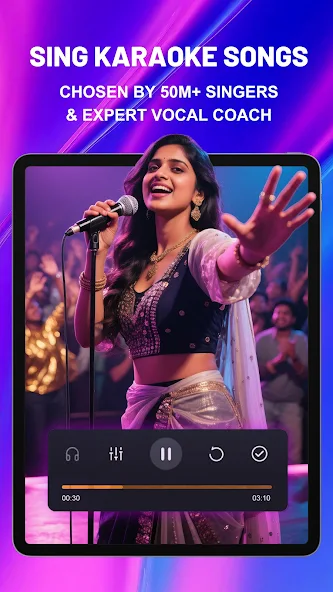
StarMaker APK is a popular karaoke and music entertainment app that lets users sing along with their favorite songs, record performances, and add creative effects.
Category: Music App
Version
v9.17.1
Size
68 MB
Android
6.0+
Update Date
21 Aug 26
Screenshots:




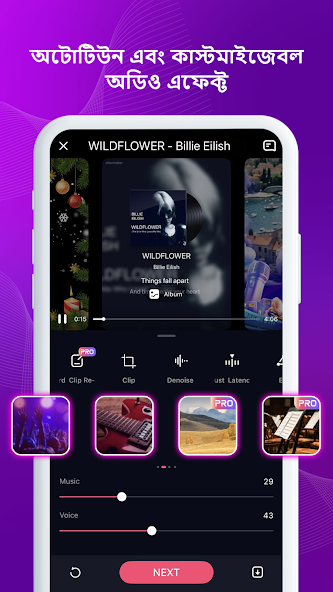


Understanding StarMaker APK
Karaoke applications have revolutionized the way music lovers interact with entertainment, moving away from traditional lounge setups into the digital era. Recommended by Appdroid.net, StarMaker APK stands out as a premier global singing community and social karaoke platform. Designed to let users unleash their inner vocal talents, the application provides an immersive environment where anyone can record tracks, apply professional audio effects, and connect with a massive international community of over 50 million music enthusiasts.

The latest Android application release brings advanced performance optimizations, smoother rolling lyrics, and a robust suite of audio-visual editing tools. Users can effortlessly explore a colossal catalog containing millions of local and international tracks spanning pop, hip-hop, R&B, folk, and electronic genres. Downloading the package directly gives modern Android device owners absolute control over their mobile entertainment and social networking ecosystem.
The Evolution of Digital Karaoke and Social Singing
The transition from physical karaoke machines to mobile application ecosystems has completely redefined how people discover and share musical talent. Early karaoke setups were restricted to heavy hardware units, specialized disks, and static television monitors found primarily in commercial venues or specialized home entertainment centers.
As mobile processing power improved and smartphone cameras advanced, developers recognized the potential to democratize singing. Music enthusiasts began seeking platforms that combined high-quality backing tracks with active social networking features. This shift paved the way for dedicated social singing ecosystems like StarMaker, which bridged the gap between personal vocal practice and global audience sharing, allowing aspiring singers to build fan bases from the comfort of their own homes.
Core Features of the StarMaker Audio Platform
The software distinguishes itself from competing entertainment apps through its deep integration of social interaction and professional-grade vocal tuning tools. Upon launching the application, users gain instant access to a sleek, modern interface designed for effortless song discovery and community engagement. The platform features real-time lyrics, collaborative duets, and interactive party rooms that go far beyond standard recording applications.
Furthermore, cutting-edge audio and video technologies provide unprecedented control over performances. Users can apply professional pitch correction, experiment with distinct acoustic filters, and record custom music videos complete with aesthetic visual filters before publishing their work to the global feed.
Features
To understand why millions of users choose this specific social karaoke platform, examine the top ten defining features that elevate the mobile singing experience:
- Massive Song Library: Access millions of local and international tracks spanning every major genre, chart-topping hit, and timeless classic.
- Professional Pitch Correction: Enhance your vocal recordings automatically using advanced tuning tools that help you sound like a polished professional.
- Interactive Party Rooms: Create or join online rooms to enjoy live singing sessions, voice chats, and friendly vocal battles with friends.
- Live Duet Capabilities: Collaborate in real-time with top artists or friends from around the world to record split-screen performance tracks.
- Dynamic Audio Effects: Apply specialized voice filters such as Distant, Warm, Vinyl, Party, and Fascinating to transform your vocal tracks.
- Custom Video Filters: Edit your selfie music videos using aesthetic visual presets like Vintage, Paris, Sunset, Urban, and Spring.
- The ‘Hook’ Feature: Save time and focus energy by singing only the most exciting chorus or bridge sections of your favorite songs.
- Active Music Community: Follow fellow creators, leave comments, send direct messages, and build a dedicated following of music fans.
- Offline Practice Support: Cache backing tracks and lyrics locally to practice your vocal runs even when disconnected from cellular networks.
- Cross-Platform Sharing: Export your finished music videos and audio tracks directly to WhatsApp, Facebook, Instagram, TikTok, and Snapchat.
Technical Specifications
Reviewing technical compatibility ensures that your smartphone runs the software smoothly without unexpected crashes or resource bottlenecks. The package is optimized to handle multimedia data streams efficiently across varied hardware configurations.
| Parameter Overview | Technical Details & Specifications |
| Application Name | StarMaker: Sing Karaoke Songs |
| Site Reference | Appdroid.net |
| Supported OS | Android 6.0 and Up |
| File Architecture | Universal APK / Native Package |
| Core Technology | Vocal Tuning & Social Streaming |
| Primary Genre | Music & Audio Entertainment |
| Storage Impact | Scalable Cache & Storage Control |
| Network Support | 4G LTE, 5G, and High-Speed Wi-Fi |
Step-by-Step Guide: How to Download and Install
Getting started with your favorite social singing application is quick and straightforward. Follow these procedures to complete your setup successfully across different operating systems.

For Android Devices (APK Installation)
- Open your device security settings and temporarily enable installation from Unknown Sources if you are sideloading an independent package file.
- Navigate to Appdroid.net via your mobile browser and locate the latest release file for StarMaker.
- Tap the download link to save the installation package directly to your device internal storage.
- Open your file manager application, locate the downloaded file, and tap on it to launch the installer prompt.
- Review requested app permissions and click Install to finish the process. Once complete, open the app, log into your account, and begin recording your favorite tracks.
For PC / Windows
- Open your preferred web browser and navigate to the official desktop download page, or open the Microsoft Store directly from your Windows desktop taskbar.
- Search for the official StarMaker application client or run it via an optimized Android emulator environment.
- Click the download or install button to configure the application automatically on your computer system.
- Sign in using your account credentials to enjoy desktop keyboard shortcuts and large-screen community browsing.
For iOS Devices
- Unlock your iPhone or iPad and open the official App Store.
- Tap the search icon at the bottom right and type StarMaker-Sing Karaoke Songs into the query field.
- Locate the official application entry and tap the Get button next to the app icon.
- Authenticate the download using Face ID, Touch ID, or your Apple ID password when prompted.
- Wait for the installation ring to complete, then launch the app from your home screen to start exploring global singing communities.
Mastering Vocal Performance and Video Editing
Recording a great cover song requires more than just knowing the lyrics; it involves balancing audio dynamics and visual presentation. The platform provides integrated editing suites that allow users to fine-tune their vocal tracks down to the smallest detail.
By utilizing pitch correction tools, singers can smooth out minor pitch discrepancies while maintaining a natural vocal tone. Furthermore, combining custom audio filters with high-definition video filters transforms a basic smartphone recording into a polished music video ready for public showcase.
Account Management and Community Engagement
Navigating account options ensures you establish your presence within the global music network effectively. The platform encourages active participation through a variety of social engagement tiers.
- Free Community Tier: Unlocks full access to the massive song library, solo recording tools, public party rooms, and community messaging features.
- VIP Membership Status: Provides exclusive virtual gifts, advanced audio editing features, priority placement in community feeds, and special profile badges.
Practical Tips for Optimizing Your Singing Journey
Maximizing your enjoyment of the platform involves exploring hidden settings, smart shortcuts, and performance strategies. Keep these practical tips in mind:
- Use Headset Microphones: Always record your tracks using wired headphones or a dedicated external microphone to eliminate background room noise and capture clean vocal audio.
- Leverage the Hook Feature: Practice difficult bridge sections using the Hook mode before attempting to record full-length track covers.
- Engage with Followers: Reply to comments on your published covers and visit other users’ party rooms regularly to grow your follower count organically within the community.
Safety, Security, and Best Practices for Package Files
Acquiring applications via independent package files requires careful attention to digital safety and verification protocols. Users should always download installation files from trusted sources like Appdroid.net to protect their mobile devices from malicious software, modified scripts, or hidden vulnerabilities. Official updates guarantee that security patches are applied promptly, safeguarding personal data and account credentials.
Frequently Asked Questions (FAQs)
Q: Is the StarMaker application free to download and use on mobile devices?
A: Yes, you can download the app, access millions of songs, record covers, and join party rooms on the free community tier without paying subscription fees.
Q: Can I collaborate with friends on songs if we live in different places?
A: Yes, the built-in Duet feature allows you to record alongside friends or top artists remotely, merging your individual performances into a single collaborative track.
Q: Do I need a professional microphone to record good songs?
A: While a good microphone helps, standard smartphone earphones equipped with an inline mic work wonderfully when combined with the app’s built-in audio enhancement tools.
Q: How do I share my recorded music videos on other social media platforms?
A: Once you finish editing your performance video, you can use the direct export buttons to share your file seamlessly to WhatsApp, Instagram, Facebook, and TikTok.
Q: What should I do if my downloaded package file fails to install?
A: Ensure that your device has sufficient storage space, allows installations from unknown sources in security settings, and that you downloaded a clean file version.
Conclusion
StarMaker APK remains a premier destination for mobile users seeking an engaging, interactive social karaoke experience. Its massive song catalog, professional vocal tuning tools, and vibrant global community make it an essential addition to any Android device. Keep your application updated to the latest version to unlock maximum performance, superior audio effects, and continuous access to world-class music entertainment.
